
AI Face Aging Generator
Upload your image and generate realistic AI aging effects instantly using AI.
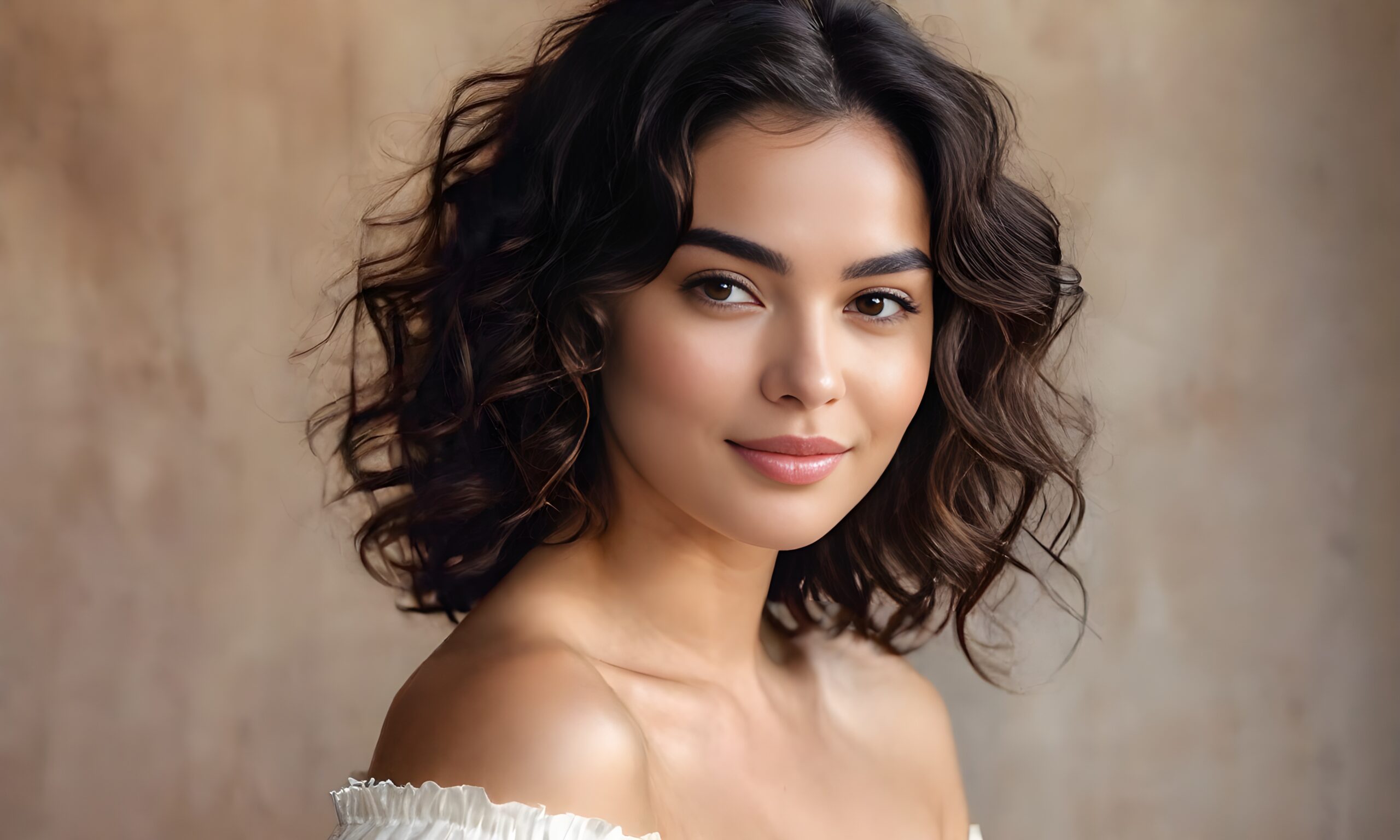
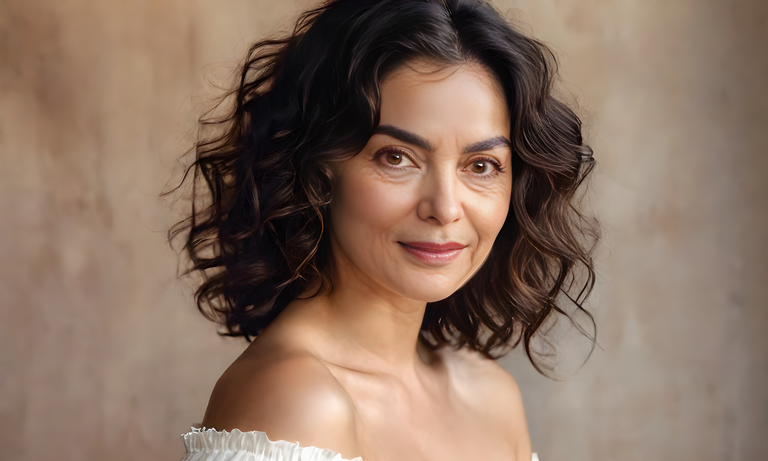
AI Face Aging Generator: How to Use This AI Tool to See Your Future Face
Artificial intelligence is changing the way people create and edit photos online. One of the most popular AI trends right now is AI face aging. With just one image, users can instantly see what they may look like in the future.
The AI Face Aging Generator makes this process simple, fast, and realistic. You upload a photo, adjust the age slider, and the AI creates an aged version of your face in seconds.
In this guide, you’ll learn:
What the AI Face Aging tool does
How to use the AI face aging generator
Features of the tool
Tips for best results
Why people love AI aging apps
Frequently asked questions
What Is an AI Face Aging Generator?
An AI Face Aging Generator is an online tool that uses artificial intelligence and deep learning models to predict how a face may look at different ages.
The tool analyzes:
Facial structure
Skin texture
Wrinkles
Hair aging
Facial contours
Expression details
Then it creates a realistic aged face transformation automatically.
This type of AI technology is commonly used in:
Entertainment
Social media content
Viral AI trends
Face transformation apps
Digital art
Future prediction tools
How the AI Face Aging Tool Works
The web app uses an AI-powered API that processes uploaded images and applies realistic aging effects based on selected age ranges.
The system works in 3 simple steps:
Upload an image
Select current age
Select target age
The AI model then generates a transformed version of the face.
How to Use the AI Face Aging Generator
Using the tool is very simple, even for beginners.
Step 1: Upload Your Photo
Click the upload area and select an image from your device.
For best results:
Use a clear face photo
Use good lighting
Use front-facing portraits
Avoid blurry images
Avoid sunglasses or masks
Supported image types include:
JPG
PNG
WEBP
Step 2: Set Your Current Age
Use the age slider to choose your current age.
Example:
18
25
30
40
This helps the AI understand the starting facial appearance.
Step 3: Select Target Age
Move the target age slider to choose how old you want the AI-generated face to appear.
Examples:
50 years old
70 years old
90 years old
The larger the age gap, the stronger the aging effect becomes.
Step 4: Generate AI Aging
Click the “Generate AI Aging” button.
The AI will process the image and create the aged result automatically.
Usually processing takes only a few seconds depending on:
Image size
Internet speed
Server load
Step 5: Download the Result
Once the AI finishes processing:
The output preview appears
You can download the generated image instantly
This makes it easy to share on:
Instagram
TikTok
Facebook
YouTube Shorts
WhatsApp
Main Features of This AI Face Aging Tool
Realistic AI Aging Effects
The AI creates natural-looking wrinkles, skin aging, and facial changes without making the image look fake.
Fast Online Processing
Everything works directly in the browser. No software installation is required.
Mobile Friendly Design
The tool is fully responsive and works on:
Android phones
iPhones
Tablets
Laptops
Desktop computers
Adjustable Age Controls
Users can customize:
Current age
Future age
This gives better control over the final result.
Instant Preview
The interface includes:
Input preview
Output preview
So users can compare the uploaded image and generated result easily.
Best Tips for Better AI Face Aging Results
To get the best AI-generated aging images, follow these tips.
Use High Quality Images
Clear photos always produce better AI results.
Low quality or blurry photos may generate distorted aging effects.
Use Front Face Photos
AI models perform better when the face is clearly visible from the front.
Side-angle photos may reduce accuracy.
Avoid Heavy Filters
Images with beauty filters or strong editing can confuse the AI model.
Natural photos work best.
Use Good Lighting
Bright and balanced lighting improves facial detection and aging realism.
Why AI Face Aging Tools Are So Popular
AI face transformation apps have become extremely popular on social media because they are:
Fun
Shareable
Viral
Interactive
People enjoy seeing:
Their future appearance
Older versions of celebrities
Family aging simulations
Funny age transformations
This trend has grown massively thanks to TikTok and Instagram reels.
Final Thoughts
AI Face Aging Generators are one of the most entertaining and useful AI photo tools available today. They combine machine learning, facial analysis, and image generation into a simple experience anyone can use.
Whether you want to:
Create viral content
Have fun with friends
Explore future face predictions
Test AI image technology
This AI aging tool makes the process fast and easy.
Just upload your image, adjust the age sliders, and let the AI generate your future face instantly.
Frequently Asked Questions (FAQs)
Learn more about the AI Age Filter, including how it works, supported image formats, privacy, downloads, and creating realistic age transformation effects online.
1. What is an AI Age Filter?
An AI Age Filter is an online tool that uses artificial intelligence to transform a face and show how a person might look younger or older. It analyzes facial features and applies realistic age progression or age regression effects in just a few seconds.
2. Is the AI Age Filter free to use?
Yes. You can use the AI Age Filter online for free without installing software or creating an account.
3. How do I use the AI Age Filter?
Upload a clear photo with a visible face, choose your preferred age effect, and let the AI generate the transformed image. Once processing is complete, you can preview and download the result.
4. Which image formats are supported?
The tool supports popular image formats such as JPG, JPEG, PNG, and WEBP, making it easy to upload photos from almost any device.
5. Can I use the AI Age Filter on my phone?
Yes. The AI Age Filter works on Android phones, iPhones, tablets, laptops, and desktop computers using any modern web browser.
6. Does the tool keep my photos private?
Your privacy is important. Depending on how the service is implemented, uploaded photos may be processed temporarily to generate the result. Avoid uploading sensitive images and review the website's privacy policy for details.
7. Can I download the edited image?
Yes. After the AI finishes processing, you can download your age-transformed image in high quality for personal use, sharing, or creative projects.
8. What types of photos work best?
For the best results, use a high-quality photo with a clear, front-facing face, good lighting, and minimal obstructions such as sunglasses, hats, or heavy shadows.
9. Can I use the AI Age Filter for social media?
Absolutely. Many users create age-transformed photos for social media posts, profile pictures, entertainment, creative edits, and sharing with friends and family.
10. Who can use the AI Age Filter?
The tool is suitable for anyone who wants to explore realistic age transformation effects, including content creators, photographers, designers, students, influencers, and casual users looking for fun photo edits.