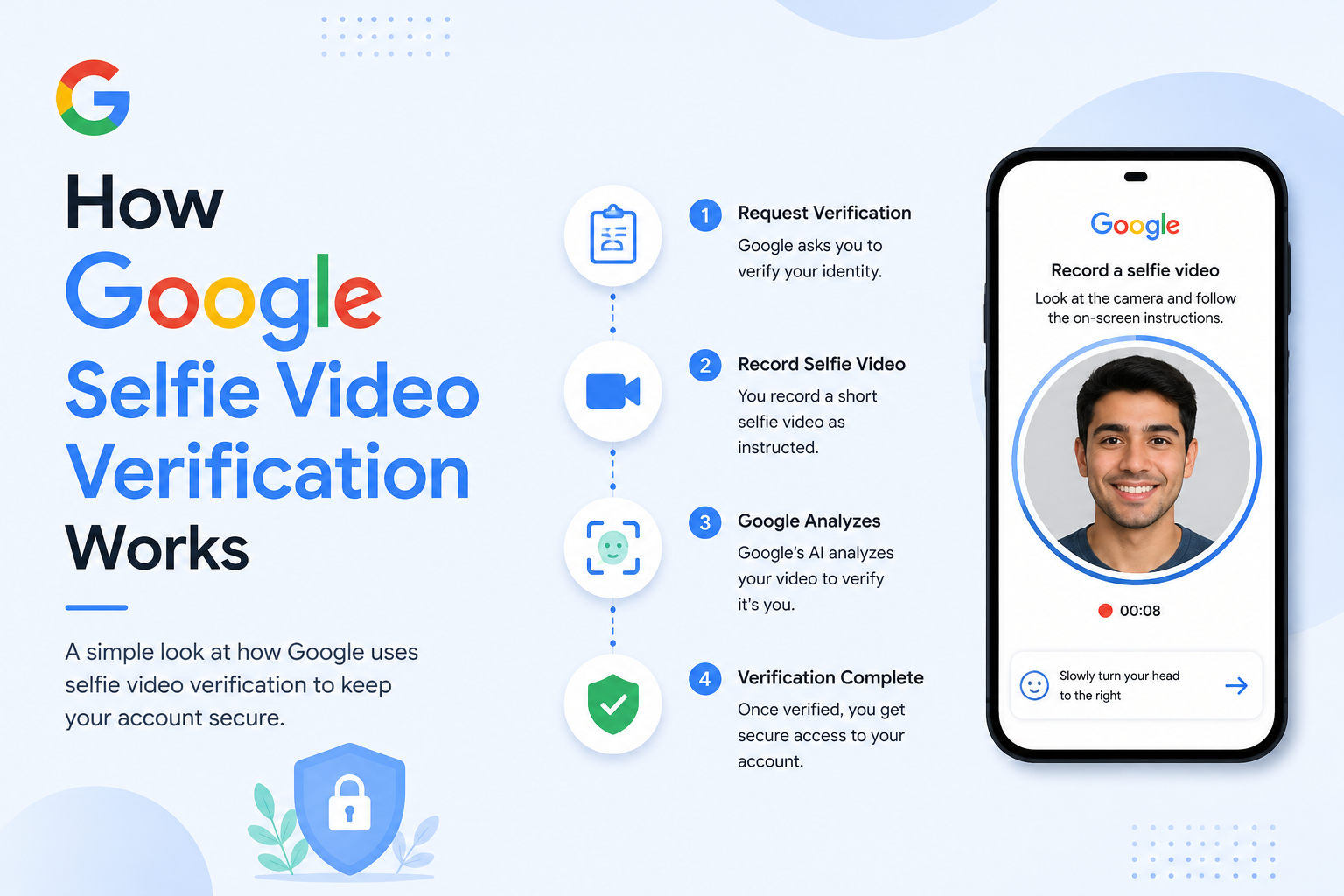
How Google Selfie Video Verification Works
Understanding Google’s New Security Feature
Google continuously updates its security systems to help users protect their accounts from unauthorised access. As cyber threats become more sophisticated, traditional methods such as passwords and security questions are not always enough to verify a user’s identity.
To strengthen account protection, Google has introduced Selfie Video Verification, a new identity verification method that may be used during sign-in or account recovery in certain situations. Instead of relying only on recovery emails or verification codes, eligible users may be asked to record a short selfie video to help confirm that they are the legitimate account owner.
This feature is part of Google’s ongoing efforts to improve account security while making the recovery process more reliable for genuine users.
In this guide, you’ll learn what Google Selfie Video Verification is, how it works, why Google introduced it, and how it can help protect your Google Account.
What Is Google Selfie Video Verification?
Google Selfie Video Verification is an identity verification feature that may ask users to record a short video of themselves during specific sign-in or account recovery situations.
The goal is to add an extra layer of security when Google needs more confidence that the person requesting access is the rightful account owner. Rather than depending solely on passwords, recovery emails, or phone verification, Google can use this additional verification step when appropriate.
The feature is not intended to replace existing security measures. Instead, it works alongside tools such as:
- Password verification
- Two-Step Verification (2SV)
- Recovery email verification
- Recovery phone verification
- Security prompts
- Device recognition
By combining multiple verification methods, Google aims to reduce the risk of unauthorised access while helping genuine users recover their accounts more securely.
Why Did Google Introduce Selfie Video Verification?
Every day, millions of Google Accounts protect valuable personal information, including:
- Gmail emails
- Google Photos
- Google Drive files
- Calendar events
- Contacts
- Payment information
- YouTube channels
- Saved passwords
Because these accounts contain sensitive data, they are attractive targets for cybercriminals.
Common threats include:
- Phishing attacks
- Stolen passwords
- Credential stuffing
- Social engineering
- Fake recovery requests
Even when someone knows your password, Google may need additional ways to verify identity before allowing account access or recovery.
Selfie Video Verification is designed to strengthen this process by adding another verification option in situations where additional confirmation is helpful.
How Account Recovery Has Changed Over Time
Online account security has evolved significantly over the years.
Passwords Only
In the early days, most online accounts relied solely on passwords.
While simple, passwords alone can be guessed, stolen, or reused across multiple websites.
Security Questions
Many services later introduced security questions, such as:
- What was your first school?
- What is your favourite colour?
- What is your mother’s maiden name?
Although these added another verification step, answers could sometimes be guessed or discovered through publicly available information.
Recovery Email and Phone Number
Google then expanded account recovery by allowing users to add:
- Recovery email addresses
- Recovery phone numbers
These methods remain important because they provide additional ways to verify ownership.
Two-Step Verification
Two-Step Verification added another layer of security by requiring:
- Your password
- A verification code
- A security key or trusted device in some cases
This significantly improved protection against unauthorised access.
Selfie Video Verification
As online threats continue to evolve, Google is introducing additional verification methods, including Selfie Video Verification, for eligible recovery or sign-in scenarios where stronger identity confirmation may be needed.
How Selfie Video Verification Improves Security
Passwords can sometimes be:
- Stolen
- Leaked in data breaches
- Reused across websites
- Shared accidentally
Recovery emails may become inaccessible.
Phone numbers can change.
Security questions may no longer provide strong protection.
Adding another verification method helps Google build greater confidence that the person requesting access is genuine.
Rather than relying on a single piece of information, Google can combine several signals when evaluating account recovery requests.
This layered approach is commonly referred to as multi-layered security, where multiple verification methods work together instead of depending on just one.
When Might Google Ask for a Selfie Video?
Google does not ask every user to record a selfie video during every sign-in.
Instead, the feature may appear in certain situations where additional identity verification is needed.
Examples could include:
- Recovering access to an account after losing your password
- Signing in from an unfamiliar device
- Access attempts that require additional verification
- Certain recovery scenarios determined by Google’s security systems
The exact circumstances depend on Google’s security processes and may vary between users.
Who Can Use This Feature?
Google generally rolls out new security features gradually.
Availability may depend on factors such as:
- Your account type
- Your region
- Device compatibility
- Google’s rollout schedule
- Specific recovery situations
Some users may see the feature before others.
If it is available for your account, Google will provide instructions during the sign-in or recovery process.
Does It Replace Two-Step Verification?
No.
Selfie Video Verification is not a replacement for Two-Step Verification (2SV).
Instead, it complements Google’s existing security features.
For the strongest protection, Google still recommends security best practices such as:
- Using a strong and unique password
- Enabling Two-Step Verification
- Keeping recovery information up to date
- Reviewing account activity regularly
- Signing in only through official Google pages
Using multiple security measures together provides stronger protection than relying on any single method.
Benefits of Selfie Video Verification
Although the feature is designed primarily for account security, it also offers potential benefits for legitimate users.
These include:
Stronger Identity Verification
A selfie video can provide an additional method of confirming account ownership in eligible recovery situations.
Improved Protection Against Fraud
Adding another verification step may make it more difficult for attackers to gain unauthorised access using stolen credentials alone.
More Reliable Account Recovery
When traditional recovery methods are unavailable, additional verification options may help eligible users regain access to their accounts.
Support for Modern Security Practices
The feature reflects Google’s broader approach of combining multiple verification methods to improve account protection.
What Users Should Know
If Google requests a selfie video during sign-in or account recovery:
- Follow the instructions displayed on the official Google page.
- Use a device with a working front-facing camera.
- Ensure your face is clearly visible in good lighting.
- Avoid using unofficial websites or apps that claim to offer Google verification.
Always verify that you are interacting with Google’s official services before submitting any personal information.
Looking Ahead
Google Selfie Video Verification represents another step in the evolution of online account security. Rather than replacing passwords or Two-Step Verification, it adds another option that may help Google verify identity in specific recovery or sign-in situations.
As cyber threats continue to evolve, layered security measures like this can help improve both account protection and recovery for legitimate users.
Lorem ipsum dolor sit amet, consectetur adipiscing elit. Ut elit tellus, luctus nec ullamcorper mattis, pulvinar dapibus leo.
How Google Selfie Video Verification Works
Step-by-Step Verification Process
Google’s Selfie Video Verification is designed to make account recovery and certain sign-in processes more secure. Rather than relying only on passwords or recovery codes, Google may request a short selfie video to help verify that the person attempting to access the account is the legitimate owner.
It’s important to note that this feature is not shown during every sign-in. Google only presents additional verification steps when its security systems determine that extra identity confirmation is needed.
In this section, we’ll walk through how the verification process works, when it may appear, and what you can do to complete it successfully.
How Google Selfie Video Verification Works
The process is designed to be straightforward for eligible users.
A typical verification flow looks like this:
- You try to sign in or recover your Google Account.
- Google performs its normal security checks.
- If additional identity verification is required and the feature is available for your account, Google may ask you to record a short selfie video.
- You follow the on-screen instructions.
- Google processes the verification.
- If the verification is successful, you can continue with the sign-in or recovery process.
The exact verification steps may vary depending on your account, device, and Google’s current security procedures.
Step 1: Start the Sign-In or Recovery Process
Begin by visiting Google’s official sign-in or account recovery page.
You’ll first enter your:
- Email address
- Phone number (if applicable)
- Password (when available)
If you’ve forgotten your password, Google will guide you through its recovery process.
Most users will complete verification using existing recovery methods without ever seeing a selfie video request.
Step 2: Google Performs Security Checks
Before requesting any additional verification, Google’s automated security systems evaluate various factors to help protect your account.
These may include:
- Whether you’ve signed in from this device before
- Your approximate sign-in location
- Recent account activity
- Available recovery information
- Security settings on your account
These checks help Google determine whether additional verification is appropriate.
Google does not publicly disclose every factor used in its security systems.
Step 3: A Selfie Video May Be Requested
If Google determines that extra verification is needed and your account is eligible for the feature, you’ll see instructions asking you to record a short selfie video.
The instructions may ask you to:
- Position your face within the camera frame.
- Look directly at the camera.
- Record the requested video.
- Follow any additional prompts displayed on screen.
Read each instruction carefully before submitting your recording.
Step 4: Record Your Selfie Video
Recording the video usually takes only a short time.
To improve the quality of your verification:
Use Good Lighting
Choose a bright area where your face is clearly visible.
Natural daylight often provides the best results.
Keep the Camera Steady
Hold your phone steadily while recording.
Excessive movement may reduce video quality.
Keep Your Entire Face Visible
Avoid covering your face with:
- Hats
- Large sunglasses
- Face masks (unless required)
- Heavy shadows
If you normally wear prescription glasses, follow Google’s on-screen guidance.
Follow Every Instruction
Google may provide specific instructions during the recording process.
Always follow those instructions rather than relying on assumptions.
Step 5: Submit the Video
After recording is complete, you’ll submit the video through Google’s secure verification process.
Depending on the situation, Google may process the verification automatically or require a short waiting period.
If additional verification is required, Google will explain the next steps on screen.
Step 6: Continue Account Recovery
If verification is successful, Google allows you to continue recovering or accessing your account.
You may then be asked to:
- Create a new password.
- Review your security settings.
- Update your recovery phone number.
- Confirm your recovery email address.
- Enable Two-Step Verification if it is not already active.
These additional steps help improve your account’s long-term security.
When Will Google Ask for a Selfie Video?
Google does not ask for a selfie video every time you sign in.
The feature is generally intended for situations where extra identity verification may be helpful.
Examples include:
- Certain account recovery requests
- Sign-ins requiring additional verification
- Situations where Google’s security systems determine that stronger identity confirmation is appropriate
The exact circumstances are determined by Google and may change over time.
Devices You May Need
To complete Selfie Video Verification, you’ll generally need:
- A smartphone or tablet with a front-facing camera
- A stable device capable of recording video
- Access to your Google Account recovery process
- Camera permissions enabled if prompted
Availability may vary depending on your device, operating system, and Google’s rollout of the feature.
Internet Connection Requirements
Although the verification involves recording a video, you’ll still need an internet connection because the process is part of Google’s online account services.
A stable connection helps ensure that:
- The verification page loads correctly.
- The recording can be submitted successfully.
- The verification process completes without interruption.
If your connection is unstable, try switching to a more reliable Wi-Fi or mobile data network before attempting verification again.
Tips for Successful Verification
You can improve your chances of completing verification smoothly by following these recommendations.
Choose a Well-Lit Location
Good lighting helps produce a clearer recording.
Avoid:
- Very dark rooms
- Bright lights directly behind you
- Heavy shadows across your face
Clean Your Camera Lens
A dirty camera lens may reduce image quality.
Wipe the lens gently with a clean, soft cloth before recording.
Hold Your Device at Eye Level
Position the camera naturally in front of your face.
Avoid extreme angles that make it difficult to capture a clear view.
Remain Still
Try not to move the device excessively while recording.
Steady footage generally provides better quality.
Follow Google’s Instructions Exactly
The most important tip is to follow the instructions displayed
by Google during the verification process.
If the prompts ask you to perform a specific action, complete it before submitting your video.
What If Verification Doesn’t Work?
Sometimes verification may not succeed on the first attempt.
Possible reasons include:
- Poor lighting
- Blurry video
- Camera problems
- Temporary network interruptions
- Failure to follow the on-screen instructions
If this happens:
- Read Google’s guidance carefully.
- Improve the recording conditions.
- Retry if prompted.
- Continue using any other recovery options Google provides.
If you’re unable to recover your account, follow the official recovery guidance available through Google’s support resources.
Best Security Practices
Even with new verification methods, maintaining good security habits remains essential.
Google recommends that users:
- Use a strong, unique password.
- Enable Two-Step Verification (2SV).
- Keep recovery information current.
- Regularly review recent account activity.
- Avoid entering account information on unofficial websites.
These practices help reduce the likelihood of unauthorised access.
How Google Selfie Video Verification Works
Privacy, Benefits, Limitations, and Best Practices
As online threats continue to evolve, technology companies are introducing stronger ways to verify users’ identities. Google’s Selfie Video Verification is one example of this trend. While the feature is designed to improve account security, many users naturally have questions about privacy, how their information is handled, and whether the feature is safe to use.
In this final part of our guide, we’ll explore the privacy considerations, benefits, limitations, account security tips, and frequently asked questions about Google Selfie Video Verification.
Is Google Selfie Video Verification Safe?
Google has introduced Selfie Video Verification as an additional identity verification method—not as a replacement for passwords or Two-Step Verification (2SV).
The feature is intended to help verify that the person requesting access to a Google Account is the legitimate owner, particularly during certain account recovery or sign-in scenarios.
As with any online security feature, users should only complete verification through Google’s official websites or apps.
If you receive an unexpected email, message, or website asking you to upload a selfie video outside Google’s official verification flow, treat it with caution and verify that you are interacting with Google directly.
Privacy Considerations
Whenever a service uses facial verification or biometric technologies, privacy becomes an important topic.
Many users ask questions such as:
- Who can access my verification data?
- Why is the video required?
- How is the information protected?
- Will the video be permanently stored?
Google provides information about its privacy practices through its official documentation and privacy policies. Users should review those resources for the most accurate and up-to-date information about how verification data is processed and managed.
Privacy policies and feature implementations may change over time, so relying on Google’s official guidance is always recommended.
Why Google Uses Multiple Verification Methods
No single security method is perfect.
For example:
- Passwords can be stolen.
- Recovery emails may become inaccessible.
- Phone numbers can change.
- Verification codes may be targeted by phishing attacks.
To improve account security, Google combines multiple verification methods rather than depending on only one.
These may include:
- Password verification
- Recovery email
- Recovery phone number
- Trusted devices
- Two-Step Verification
- Security prompts
- Selfie Video Verification (when applicable)
This layered approach helps reduce the likelihood of unauthorised account access.
Benefits of Selfie Video Verification
Google’s new verification method offers several potential advantages.
1. Better Identity Verification
A short selfie video can provide an additional way to help confirm that the person requesting account access is the legitimate owner.
This can be especially useful in certain account recovery situations.
2. Improved Protection Against Fraud
Cybercriminals often obtain passwords through phishing attacks or data breaches.
Additional verification steps make it more difficult for attackers to rely solely on stolen credentials.
3. Easier Recovery for Genuine Users
Sometimes users lose access to:
- Recovery email addresses
- Recovery phone numbers
- Passwords
Additional identity verification methods may help eligible users recover access to their accounts more securely.
4. Supports Google’s Existing Security System
Selfie Video Verification complements Google’s existing security tools rather than replacing them.
Users can continue benefiting from:
- Two-Step Verification
- Security alerts
- Device recognition
- Account activity monitoring
Together, these features create multiple layers of protection.
Limitations of Selfie Video Verification
Like any technology, Selfie Video Verification has practical limitations.
Availability
The feature may not be available for every Google Account.
Google often rolls out new features gradually, and availability can vary by account type, region, and device compatibility.
Device Requirements
Users typically need:
- A compatible smartphone or tablet
- A working front-facing camera
- Camera permissions enabled
- An internet connection
Without these requirements, verification may not be possible.
Lighting and Camera Quality
Poor lighting or a blurry camera image can affect the verification process.
For better results:
- Use natural lighting when possible.
- Keep the camera lens clean.
- Hold the device steady.
- Follow the on-screen instructions carefully.
Internet Dependency
Although the verification uses a selfie video, it is still part of Google’s online account services.
A stable internet connection is required to complete the verification process.
Tips to Protect Your Google Account
Whether or not Selfie Video Verification is available for your account, these security habits can help keep your information safe.
Use a Strong Password
Create a unique password that combines:
- Uppercase letters
- Lowercase letters
- Numbers
- Symbols
Avoid using the same password across multiple websites.
Enable Two-Step Verification
Two-Step Verification adds another security layer by requiring additional confirmation during sign-in.
This significantly reduces the risk of unauthorised access.
Keep Recovery Information Updated
Regularly review your:
- Recovery email address
- Recovery phone number
Current recovery information makes it easier to regain access if you forget your password.
Review Security Alerts
Google sends alerts about important account activity.
Pay attention to notifications regarding:
- New device sign-ins
- Password changes
- Recovery information updates
- Suspicious login attempts
If something looks unfamiliar, review your account security immediately.
Watch Out for Phishing
Never upload a selfie video or enter your Google credentials on unofficial websites.
Before signing in:
- Check that you’re on Google’s official website.
- Verify the website address.
- Be cautious of links sent through unexpected emails or messages.
Legitimate Google verification requests occur within Google’s official sign-in or recovery process.
Common Myths About Selfie Video Verification
Myth 1: Google Will Ask for a Selfie Every Time You Sign In
Fact: No. Selfie Video Verification is expected to appear only in certain situations where additional identity verification is needed.
Myth 2: Selfie Video Replaces Passwords
Fact: No. Passwords remain an important part of Google Account security.
Selfie Video Verification is an additional verification method—not a replacement.
Myth 3: Everyone Has the Feature Immediately
Fact: Google usually rolls out new features gradually.
Some users may receive access before others.
Myth 4: You Can Skip All Other Security Settings
Fact: No.
Users should continue using:
- Strong passwords
- Two-Step Verification
- Recovery email
- Recovery phone number
These security features continue to play an important role.
Google Selfie Video Verification FAQ
Learn how Google's new Selfie Video Verification feature works, when it appears, how it improves account security, and what you should know before using it.
What is Google Selfie Video Verification?
When will Google ask for a selfie video?
Does every Google user have this feature?
Is Google Selfie Video Verification safe?
Does Selfie Video Verification replace Two-Step Verification?
What device do I need for Selfie Video Verification?
What should I do if the verification fails?
Will Google ask for a selfie video every time I sign in?
Can I use Selfie Video Verification without an internet connection?
How can I make my Google Account more secure?
Final Thoughts
Google Selfie Video Verification is another step in the company’s ongoing efforts to improve account security. By adding an extra identity verification option during selected sign-in and account recovery situations, Google aims to make it more difficult for unauthorised users to access accounts while helping legitimate users recover them more securely.
Although the feature is still being introduced to eligible users, it reflects a broader trend toward layered security, where multiple verification methods work together to protect personal information.
For the strongest protection, continue to follow Google’s recommended security practices: use a unique password, enable Two-Step Verification, keep your recovery information up to date, and only complete verification through Google’s official websites and apps.
As online threats continue to evolve, combining good security habits with modern verification technologies will help keep your Google Account safer and more resilient against unauthorised access.