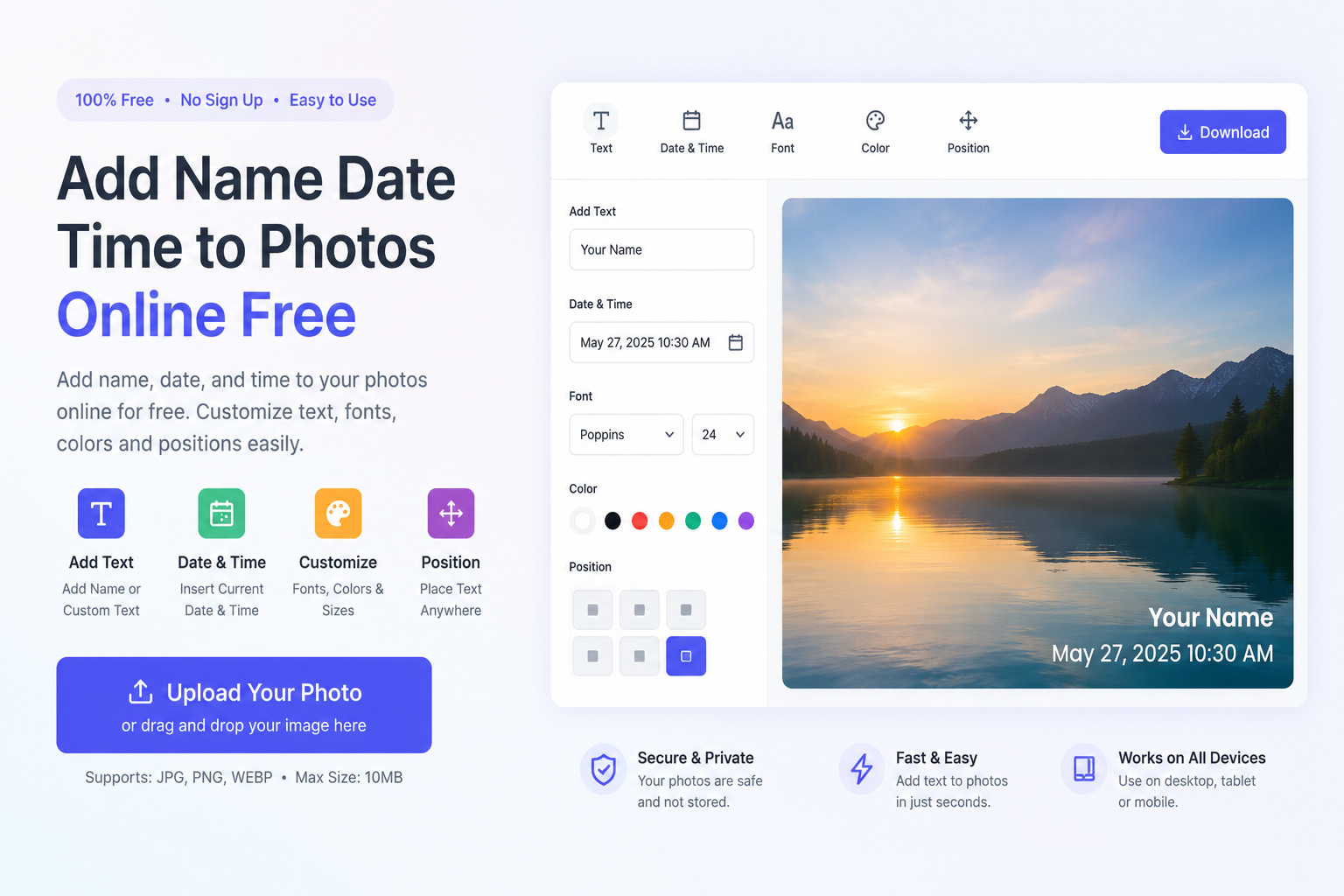
Add Name, Date, and Time to Photos Easily on Windows
Adding a name, date, and time to photos is one of the easiest ways to organize your memories, manage work records, and create professional-looking images. Whether you’re a photographer, traveler, business owner, student, or content creator, visible timestamps and custom text make your photos more informative and easier to identify.
With Add Name Date Time to Photos, you can quickly stamp your images with a name, date, time, location details, or custom text. The app is simple to use, works smoothly on Windows, and lets you personalize your photos without complicated editing software.
Why Add Name, Date, and Time to Photos?
Photos tell a story, but adding a visible date and time stamp makes that story even clearer. While most cameras save information in photo metadata, it isn’t always visible after sharing images online. A timestamp printed directly on the image stays visible wherever the photo goes.
This feature is useful for many purposes, including:
Travel photography
Family photo albums
Business documentation
Construction site records
Property inspections
Event photography
School and college projects
Insurance documentation
Personal memories
Moreover, adding your name or company name helps protect your images and gives them a professional appearance.
Powerful Features for Easy Photo Editing
Add Name Date Time to Photos includes everything you need to personalize your images in just a few clicks.
Add Custom Text
Insert your name, company name, event title, location, or any custom message onto your photos.
Add Date and Time
Automatically display the current date and time or choose your preferred timestamp format.
Customize Fonts
Select from different fonts, colors, text sizes, and styles to match your photo perfectly.
Flexible Positioning
Place your text in any corner or move it anywhere on the image for the best appearance.
High-Quality Output
Save edited photos without reducing image quality.
In addition, the app provides a clean and user-friendly interface that makes editing simple for beginners and professionals alike.
How to Add Name, Date, and Time to Photos
Editing your photos is quick and straightforward.
Step 1
Open Add Name Date Time to Photos on your Windows PC.
Step 2
Select one or multiple photos from your computer.
Step 3
Enter the name, date, time, or custom text you want to display.
Step 4
Customize the font, color, text size, opacity, and placement.
Step 5
Preview your changes before saving.
Step 6
Save the edited images in high quality.
As a result, your photos will be ready to share, print, or archive.
Add Name, Date & Time to Photos Online Free
Quickly add names, dates, timestamps, custom text, and watermarks to your photos. No complicated editing software required. Fast, simple, and completely free to use.
🚀 Try the Tool NowNo Cost
Edit in Seconds
No Quality Loss
Name, Date & Time
Perfect for Personal and Professional Use
The app is designed for anyone who wants to add professional-looking timestamps to photos.
It is ideal for:
Photographers
Bloggers
Content creators
Business owners
Real estate agents
Engineers
Surveyors
Students
Teachers
Travelers
Families
Social media creators
Furthermore, businesses can use the app to document projects, while individuals can organize personal memories more effectively.
Whether you’re creating photo records, travel albums, or social media content, adding a date and time stamp helps keep everything organized.
Why Choose Add Name Date Time to Photos?
There are many photo editing apps available, but Add Name Date Time to Photos focuses on one thing: making photo timestamping simple, fast, and reliable.
Unlike complicated editing software, this app lets you add names, dates, and timestamps in just a few minutes. You don’t need professional editing skills to create polished, organized photos.
Key Benefits
Add names to photos instantly
Add date and time stamps
Customize fonts and colors
Place text anywhere on the image
Preserve original image quality
Easy-to-use Windows interface
Fast editing process
High-quality photo export
In addition, the lightweight design ensures smooth performance without slowing down your computer.
Final Thoughts
If you’re looking for the best way to add a name, date, and time to photos on Windows, Add Name Date Time to Photos is an excellent choice. It combines powerful editing features with a simple interface, making it suitable for beginners and experienced users alike.
Whether you’re organizing family memories, documenting work, creating travel albums, or preparing professional reports, this app helps you personalize your images quickly and efficiently. Download Add Name Date Time to Photos today and create well-organized, professional-looking photos with customizable names, dates, and timestamps in just a few clicks.
Frequently Asked Questions (FAQs)
Find answers to the most common questions about using the Add Name Date Time to Photos Online Free tool, including customization options, image quality, supported uses, and how to add timestamps to your photos.
1. What is Add Name Date Time to Photos Online Free?
Add Name Date Time to Photos Online Free is a simple online photo editing tool that lets you add a custom name, date, time, location, watermark, or any text to your pictures. You can also customize the font style, color, size, opacity, and text position to create professional or personalized images.
2. How do I add a date and time to a photo?
Upload your photo, choose the Date & Time option, customize the timestamp format, font, color, and placement, then download your edited image in high quality.
3. Can I add my name to a photo?
Yes. You can add your name, company name, event title, project name, location, address, or any custom text to your photos. The text can be positioned anywhere on the image.
4. Can I customize the font and text color?
Absolutely. You can customize font style, font size, text color, background color, opacity, alignment, and text position to match the appearance of your photo.
5. Does the tool reduce image quality?
No. Your edited photos are exported in high quality, preserving image clarity and sharpness while adding names, dates, timestamps, or other custom text.
6. Can I use the tool for business photos?
Yes. Businesses commonly use the tool for construction site photos, inspection reports, project documentation, real estate listings, field surveys, inventory records, delivery proofs, and work progress tracking.
7. Is Add Name Date Time to Photos Online Free easy to use?
Yes. The tool features a clean, beginner-friendly interface that allows anyone to add names, dates, times, and custom text to photos in just a few simple steps.
8. Can I add custom text besides the date and time?
Yes. You can add names, addresses, captions, event titles, company names, GPS coordinates, watermarks, project details, or any custom message to your photos.
9. Who can use this photo editing tool?
This tool is perfect for photographers, bloggers, students, teachers, travelers, engineers, surveyors, construction professionals, real estate agents, business owners, content creators, and anyone who wants organized, professional-looking photos.
10. Why should I add a date and time to my photos?
Adding visible timestamps makes photos easier to organize, verify, and identify. It's especially useful for documenting projects, preserving travel memories, maintaining business records, recording inspections, creating legal evidence, and organizing personal photo collections.