Building Intelligent AI Systems Using Google ADK
Part 1: Introduction + Understanding the Architecture
Artificial Intelligence has evolved rapidly over the past few years. We started with simple chatbots capable of answering basic questions, then moved to powerful Large Language Models (LLMs) like Gemini, GPT, Claude, and Llama that can write code, analyze documents, summarize research, and solve complex reasoning tasks.
However, despite their impressive capabilities, a single AI model still faces important limitations. When one model is responsible for every task, it must understand user intent, search external data, retrieve documentation, reason through the information, generate content, and verify the final output. As applications become more sophisticated, this “one model does everything” approach becomes increasingly difficult to maintain.
This is where Multi-Agent AI Systems are transforming modern AI application development.
Instead of assigning every responsibility to one large model, developers can create a team of specialized AI agents. Each agent focuses on a specific domain or responsibility, collaborates with other agents, and contributes its expertise to solve the user’s request.
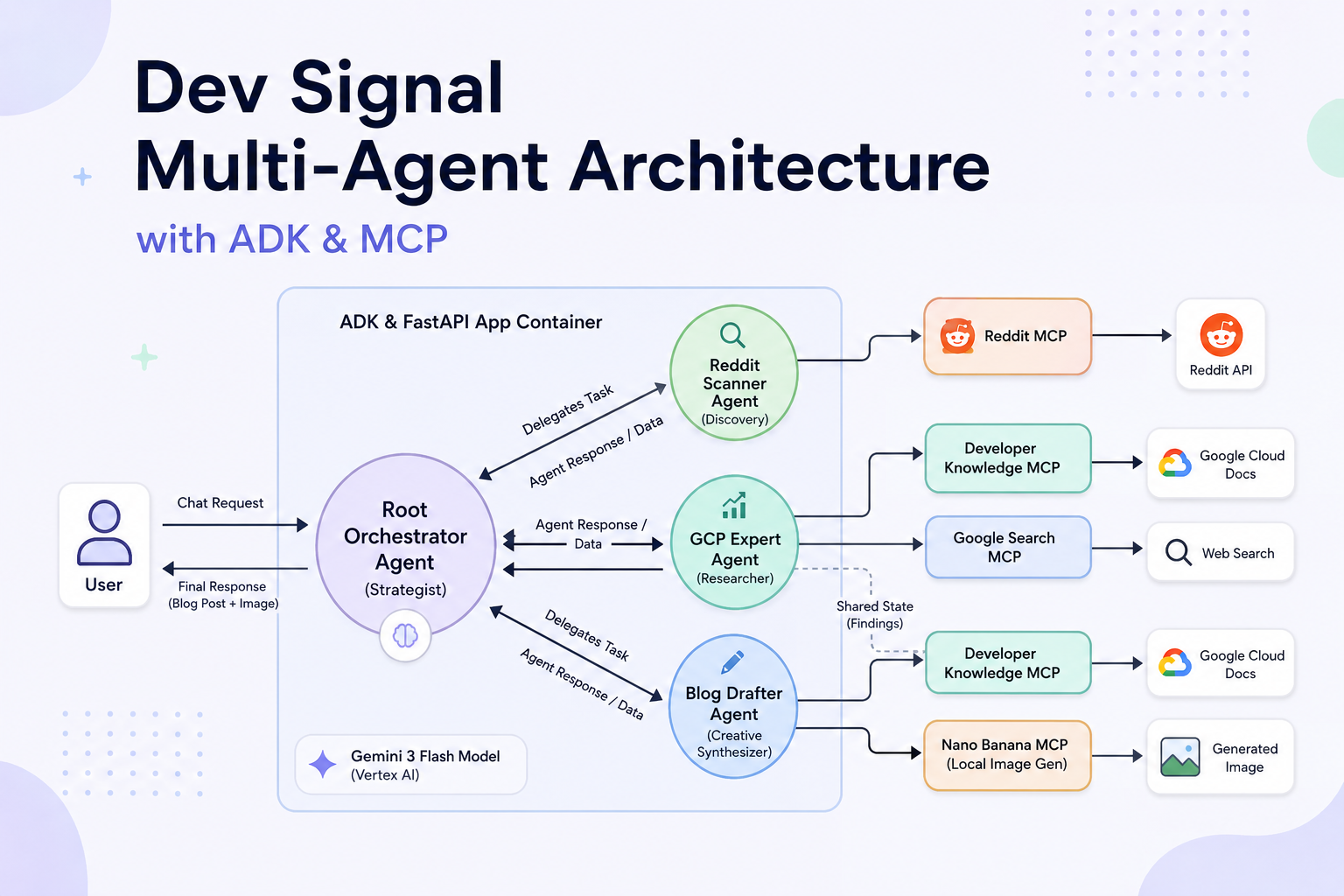
The architecture shown below demonstrates this concept using Google Agent Development Kit (ADK), Model Context Protocol (MCP), FastAPI, Gemini 3 Flash, and Vertex AI.
This design follows a modular, scalable approach where intelligent agents collaborate like members of a software engineering team.
Why Multi-Agent Architecture Matters
Imagine you ask an AI assistant:
“Write a detailed blog about the latest Google Cloud AI services with supporting Reddit discussions and generate a featured image.”
A traditional chatbot would need to:
- Understand your request
- Search Google Cloud documentation
- Search Reddit discussions
- Analyze community opinions
- Generate a blog
- Create an image
- Combine everything into one response
Although modern LLMs can perform many of these tasks, handling everything inside a single prompt often leads to:
- Longer response times
- Context limitations
- Higher token usage
- Reduced accuracy
- Difficulty integrating external tools
- Limited scalability
Now imagine assigning each responsibility to a dedicated specialist.
One AI agent researches Google Cloud documentation.
Another analyzes Reddit discussions.
A third writes the article.
A fourth generates the image.
Finally, a coordinator combines all outputs into a polished response.
This collaborative workflow is exactly what the Dev Signal Multi-Agent Architecture enables.
What is the Dev Signal Multi-Agent Architecture?
The Dev Signal Multi-Agent Architecture is a distributed AI system where multiple intelligent agents collaborate under the supervision of a central orchestration agent.
Instead of relying on one monolithic AI assistant, the architecture divides work into specialized components that communicate with one another through structured workflows.
At a high level, the architecture includes:
- A user interface
- A Root Orchestrator Agent
- Multiple specialized AI agents
- MCP servers
- External APIs and knowledge sources
- Gemini 3 Flash running on Vertex AI
- Shared application state
- FastAPI application container
Each component has a clearly defined responsibility, making the overall system easier to extend, debug, and maintain.
High-Level Architecture Overview
The architecture consists of several layers that work together to process a user’s request efficiently.
                 User
                  │
                  ▼
        Root Orchestrator Agent
        (Strategic Coordinator)
                  │
        ┌─────────┼──────────┐
        ▼         ▼          ▼
 Reddit Agent   GCP Agent   Blog Agent
        │         │          │
        ▼         ▼          ▼
    Reddit MCP  Google MCP  Nano Banana MCP
        │         │          │
        ▼         ▼          ▼
 External APIs Documentation Image Generator
                  │
                  ▼
      Final Response to User
Rather than processing everything sequentially in a single AI prompt, each agent independently solves part of the overall problem.
The orchestrator then combines their outputs into one coherent response.
Breaking Down the Architecture
The diagram is divided into four major sections.
1. User Layer
Every workflow begins with the user.
The user submits a natural language request, such as:
- Explain Google Cloud Run
- Compare GKE and Cloud Run
- Write a technical blog
- Research Reddit discussions
- Generate diagrams
- Create blog images
The user doesn’t need to know which tools or APIs are involved. They simply describe the outcome they want.
The system interprets the request and determines which specialized agents should participate.
This abstraction is one of the greatest strengths of modern AI systems.
2. ADK & FastAPI Application Container
The large blue box in the architecture represents the application’s execution environment.
This container includes:
- Google Agent Development Kit (ADK)
- FastAPI backend
- Agent definitions
- State management
- Routing logic
- Authentication
- API endpoints
Think of this as the control center where every AI agent lives.
FastAPI exposes REST endpoints that receive user requests.
ADK provides the framework for defining, managing, and coordinating AI agents.
Together, they create a production-ready environment for deploying multi-agent AI applications.
Instead of writing custom orchestration logic from scratch, developers can leverage ADK’s abstractions for agent communication, task delegation, and lifecycle management.
3. Gemini 3 Flash on Vertex AI
At the heart of the architecture is the language model powering the agents.
The diagram uses Gemini 3 Flash running on Vertex AI.
Gemini serves as the reasoning engine behind each agent.
It is responsible for tasks such as:
- Understanding user intent
- Planning execution
- Summarizing documents
- Writing technical content
- Answering questions
- Generating structured outputs
- Producing human-readable responses
Rather than exposing Gemini directly to the user, the architecture wraps it inside specialized agents.
Each agent applies its own instructions, tools, and context before interacting with the model. This results in more focused, reliable, and domain-specific behavior.
4. Root Orchestrator Agent
The most important component in the architecture is the Root Orchestrator Agent, labeled as the Strategist in the diagram.
Instead of performing every task itself, the orchestrator acts like a project manager.
Its responsibilities include:
- Understanding the user’s request
- Identifying the required tasks
- Delegating work to the appropriate agents
- Managing execution order
- Collecting responses
- Resolving dependencies
- Producing the final response
For example, if a user requests a blog that includes Google Cloud research, Reddit insights, and a generated image, the orchestrator can assign these tasks in parallel:
- The GCP Expert Agent gathers official documentation and technical details.
- The Reddit Scanner Agent collects community discussions and trends.
- The Blog Drafter Agent synthesizes the research into a polished article and coordinates image generation if needed.
Once these agents finish their work, the orchestrator reviews the combined results, ensures consistency, and returns a complete response to the user.
This separation of responsibilities makes the system more scalable, easier to maintain, and better suited for handling complex, multi-step workflows.
Why This Architecture Is Effective
Traditional AI assistants rely on a single model to perform every task, which can become inefficient as complexity grows. In contrast, the Dev Signal Multi-Agent Architecture embraces a collaborative approach where each agent specializes in a particular domain.
This design offers several advantages:
- Scalability: New agents can be added without redesigning the entire system.
- Specialization: Each agent focuses on a specific task, improving accuracy.
- Parallel Execution: Independent tasks can run simultaneously, reducing response times.
- Maintainability: Updating or replacing one agent has minimal impact on the rest of the system.
- Tool Integration: MCP servers provide secure and structured access to external APIs, documentation, and services.
By combining Google ADK, FastAPI, Gemini 3 Flash, Vertex AI, and MCP, the architecture creates a flexible foundation for building intelligent applications that can research, reason, generate content, and automate workflows with greater reliability than traditional single-agent systems.
The Root Orchestrator Agent – The Brain Behind the Multi-Agent System
In the previous part, we explored the overall architecture of the Dev Signal Multi-Agent system and learned how multiple AI agents collaborate to solve complex tasks. While every specialized agent has an important role, the entire workflow depends on one central component that keeps everything organized: the Root Orchestrator Agent.
Think of the Root Orchestrator Agent as the project manager of an experienced software development team. It doesn’t write every line of code or perform every task itself. Instead, it understands the project requirements, assigns work to the right specialists, tracks progress, combines results, and ensures the final deliverable meets the user’s expectations.
This orchestration layer is what transforms a collection of independent AI agents into a coordinated, intelligent system capable of handling sophisticated, multi-step requests.
Why Do We Need an Orchestrator?
Imagine a user submits the following request:
“Write a detailed blog about Google Cloud Run, include the latest community discussions from Reddit, reference official Google Cloud documentation, and generate a featured image for the article.”
Although this looks like a single prompt, it actually contains several independent tasks:
- Understand the user’s intent.
- Research official Google Cloud documentation.
- Search Reddit for community discussions and insights.
- Analyze and organize the collected information.
- Write a well-structured technical blog.
- Generate a relevant featured image.
- Combine everything into a polished final response.
Without an orchestrator, one AI model would have to perform all these tasks sequentially within a single conversation. As the request grows in complexity, this approach becomes difficult to manage, increases response time, and makes debugging more challenging.
The Root Orchestrator Agent solves this by breaking the request into smaller, manageable tasks and assigning each one to the most suitable specialized agent.
Position of the Root Orchestrator in the Architecture
Looking at the architecture diagram, the Root Orchestrator Agent sits at the center of the system.
                User
                  │
                  ▼
       Root Orchestrator Agent
        (Strategic Decision Maker)
          │       │        │
          ▼       ▼        ▼
     Reddit   GCP Expert   Blog
      Agent      Agent    Drafter
Every request passes through the orchestrator before reaching any specialized agent.
Likewise, every response generated by those agents returns to the orchestrator before being sent back to the user.
This central position allows the orchestrator to maintain complete visibility over the workflow, ensuring tasks are coordinated effectively and the final response is consistent.
Responsibilities of the Root Orchestrator Agent
The Root Orchestrator Agent performs much more than simple request routing. It acts as the strategic controller for the entire AI system, managing the complete lifecycle of a user’s request.
Its core responsibilities include:
- Understanding user intent.
- Planning the workflow.
- Selecting the appropriate AI agents.
- Delegating tasks.
- Managing execution order.
- Collecting intermediate responses.
- Handling shared state.
- Merging outputs into a final response.
- Returning the completed result to the user.
Rather than executing every task itself, the orchestrator focuses on coordination, allowing specialized agents to perform the work they are designed for.
Step 1: Understanding User Intent
The first responsibility of the orchestrator is interpreting the user’s request.
Users rarely specify which tools, APIs, or services should be used. Instead, they describe the desired outcome in natural language.
For example:
“Compare Cloud Run and GKE, include Reddit opinions, and write a blog.”
The orchestrator analyzes the request and identifies its key components:
- Technical comparison
- Official documentation lookup
- Community research
- Blog writing
Instead of treating this as one large task, it decomposes the request into several smaller objectives that can be handled independently.
This planning stage is essential because it determines which agents need to participate and what information each agent requires.
Step 2: Creating an Execution Plan
Once the user’s intent is understood, the orchestrator generates an execution plan.
For the previous example, the workflow might look like this:
User Request
      │
      ▼
Understand Intent
      │
      ▼
Create Task List
      │
      ├────────► Research Google Cloud
      │
      ├────────► Scan Reddit Discussions
      │
      ├────────► Draft Technical Blog
      │
      └────────► Generate Blog Image
Each task is independent and can often be executed in parallel, reducing overall response time.
Step 3: Delegating Tasks to Specialized Agents
With the execution plan ready, the orchestrator delegates each task to the most appropriate agent.
For example:
| Task | Assigned Agent |
|---|---|
| Search Reddit discussions | Reddit Scanner Agent |
| Retrieve Google Cloud documentation | GCP Expert Agent |
| Write the technical article | Blog Drafter Agent |
| Generate blog image | Nano Banana MCP |
This division of labor ensures that each task is handled by an agent optimized for that specific responsibility.
The orchestrator doesn’t need to understand the internal workings of every tool. It only needs to know which agent is best suited for each task.
Step 4: Coordinating Parallel Execution
One of the greatest strengths of a multi-agent architecture is the ability to execute independent tasks simultaneously.
Instead of waiting for one task to finish before starting the next, the orchestrator can launch multiple agents at the same time.
For example:
              Root Orchestrator
                     │
     ┌───────────────┼───────────────┐
     ▼               ▼               ▼
 Reddit Agent   GCP Expert     Blog Agent
     │               │
     ▼               ▼
 Reddit API     Google Docs
While the Reddit Scanner Agent retrieves community discussions, the GCP Expert Agent can simultaneously gather official documentation. Once both tasks are complete, the Blog Drafter Agent uses the combined information to create a comprehensive article.
This parallel execution significantly reduces latency and improves efficiency.
Step 5: Managing Shared State
As shown in the architecture diagram, the GCP Expert Agent shares a technical research findings state with the Blog Drafter Agent.
This shared state acts as a central repository where agents can store and access intermediate results.
Instead of repeating the same research, agents can reuse existing information.
For example:
Research Findings
-----------------
Cloud Run
Pricing
Best Practices
Security
Deployment
Performance
The Blog Drafter Agent reads this shared state to create accurate, well-informed content without needing to perform the research again.
This approach minimizes redundant work, reduces API calls, and ensures consistency across the system.
Step 6: Collecting Agent Responses
Once each specialized agent completes its assigned task, the results are returned to the orchestrator.
For example:
Reddit Agent
      │
      ▼
Community Insights

GCP Agent
      │
      ▼
Official Documentation

Blog Agent
      │
      ▼
Technical Blog Draft

Image Generator
      │
      ▼
Featured Image
The orchestrator gathers these outputs and prepares them for the final assembly.
Step 7: Synthesizing the Final Response
The orchestrator’s final responsibility is to combine all the collected information into a cohesive response.
This may involve:
- Merging research findings.
- Removing duplicate information.
- Ensuring consistent formatting.
- Verifying logical flow.
- Attaching generated images.
- Producing the final blog or answer.
The user receives a polished response without needing to know that multiple agents collaborated behind the scenes.
Communication Between Agents
The architecture diagram illustrates two-way communication between the Root Orchestrator Agent and the specialized agents.
Each interaction follows a simple pattern:
Root Orchestrator
        │
        │ Delegate Task
        ▼
Specialized Agent
        │
        │ Execute Task
        ▼
External Tool or MCP
        │
        ▼
Agent Response
        │
        ▼
Root Orchestrator
This structured communication keeps responsibilities clearly separated and simplifies debugging and maintenance.
Why This Design Scales Well
A major advantage of the orchestrator pattern is scalability. As application requirements evolve, new capabilities can be added by introducing additional specialized agents rather than modifying the entire system.
For example, you could add:
- Security Audit Agent to review code for vulnerabilities.
- Database Expert Agent to optimize SQL queries.
- Testing Agent to generate unit and integration tests.
- Translation Agent to localize content into multiple languages.
- SEO Optimization Agent to improve search engine rankings.
- Analytics Agent to interpret application metrics and logs.
The Root Orchestrator simply learns when to invoke these new agents based on the user’s request, while the existing workflow remains largely unchanged.
Benefits of the Root Orchestrator Pattern
Implementing a central orchestrator offers several practical advantages:
- Clear Separation of Responsibilities: Each agent focuses on a specific task, making the system easier to understand and maintain.
- Improved Scalability: New agents and tools can be integrated without redesigning the entire architecture.
- Efficient Resource Usage: Independent tasks run in parallel, reducing overall response times.
- Better Reliability: Failures can be isolated to individual agents, allowing retries or graceful degradation.
- Simplified Maintenance: Individual agents can be updated or replaced without impacting the rest of the system.
- Consistent User Experience: The orchestrator ensures all outputs are merged into a unified, high-quality response.
Key Takeaways
The Root Orchestrator Agent is the central intelligence that enables the Dev Signal Multi-Agent Architecture to function as a coordinated system rather than a collection of independent AI components. By interpreting user intent, planning workflows, delegating tasks, managing shared state, coordinating parallel execution, and synthesizing results, it delivers accurate and scalable AI-driven solutions.
In the next part, we will dive into the specialized agents themselves, exploring how the Reddit Scanner Agent, GCP Expert Agent, and Blog Drafter Agent use the Model Context Protocol (MCP) to interact with external APIs, official documentation, search tools, and image generation services.
Specialized AI Agents and MCP Integration – Powering Intelligent Collaboration
In the previous section, we explored how the Root Orchestrator Agent acts as the central coordinator of the Dev Signal Multi-Agent Architecture. It receives user requests, creates an execution plan, delegates tasks, and combines the outputs from different agents into a unified response.
However, the orchestrator alone cannot perform every task. Its real strength comes from working with a team of specialized AI agents, each designed to handle a specific responsibility. Instead of building one massive AI model that attempts to do everything, this architecture follows the principle of specialization.
Each agent has its own expertise, access to specific tools, and clearly defined responsibilities. They communicate with external systems through the Model Context Protocol (MCP), allowing them to retrieve real-time information, access documentation, perform searches, and even generate images.
This modular design makes the architecture scalable, maintainable, and highly effective for complex AI workflows.
Understanding Specialized AI Agents
Think of a software development team.
A successful project is rarely completed by a single developer. Instead, different specialists contribute their expertise:
- Backend developers build APIs.
- Frontend developers create user interfaces.
- Database engineers optimize data storage.
- DevOps engineers manage deployments.
- QA engineers test the application.
Similarly, the Dev Signal Multi-Agent Architecture assigns different responsibilities to specialized AI agents.
Each agent focuses on solving one type of problem exceptionally well rather than attempting to solve every problem.
In the architecture diagram, three primary agents work alongside the Root Orchestrator:
- Reddit Scanner Agent
- GCP Expert Agent
- Blog Drafter Agent
Each agent communicates with one or more MCP servers to perform its assigned tasks.
The Reddit Scanner Agent
The Reddit Scanner Agent is responsible for gathering insights from Reddit communities.
Technical discussions on Reddit often include:
- Real-world experiences
- Best practices
- Common issues
- Performance comparisons
- Developer opinions
- Troubleshooting tips
Unlike official documentation, Reddit provides community-driven perspectives that help users understand how technologies perform in real-world scenarios.
For example, a user might ask:
“What do developers think about Cloud Run compared to Kubernetes?”
The Reddit Scanner Agent processes this request by:
- Understanding the search topic.
- Connecting to the Reddit MCP server.
- Querying the Reddit API.
- Retrieving relevant discussions.
- Filtering useful responses.
- Summarizing key community insights.
- Returning structured findings to the Root Orchestrator.
The orchestrator can then combine these community insights with official documentation to produce a balanced and informative response.
Reddit Scanner Workflow
User Request
      │
      ▼
Root Orchestrator
      │
Delegate Task
      ▼
Reddit Scanner Agent
      │
      ▼
Reddit MCP Server
      │
      ▼
Reddit API
      │
      ▼
Community Discussions
      │
      ▼
Summary Returned
This separation ensures the Reddit-specific logic remains isolated within the Reddit Scanner Agent, making the overall system easier to maintain and extend.
Why Use a Dedicated Reddit Agent?
Instead of allowing every AI agent to interact directly with Reddit, a dedicated Reddit Scanner Agent offers several benefits:
- Consistent data retrieval from Reddit.
- Standardized summarization of discussions.
- Centralized filtering of irrelevant or low-quality content.
- Easier updates if Reddit APIs change.
- Improved security by limiting API access.
- Reusable functionality across multiple workflows.
If another agent requires Reddit insights in the future, it can simply request them from the Reddit Scanner Agent rather than implementing its own Reddit integration.
The GCP Expert Agent
The GCP Expert Agent acts as the technical researcher within the system.
Its primary responsibility is to gather accurate and up-to-date technical information related to Google Cloud services.
Typical tasks include:
- Searching Google Cloud documentation
- Explaining cloud services
- Comparing Google Cloud products
- Retrieving architecture recommendations
- Finding deployment guides
- Researching APIs
- Collecting configuration examples
Unlike Reddit discussions, which reflect community experiences, the GCP Expert Agent focuses on authoritative technical information.
GCP Expert Workflow
User Request
      │
      ▼
Root Orchestrator
      │
Delegate Research
      ▼
GCP Expert Agent
      │
 ┌────┴──────────────┐
 ▼                   ▼
Developer MCP    Google Search Tool
 │                   │
 ▼                   ▼
Cloud Docs      Web Search
 │                   │
 └──────────────┬────┘
                ▼
      Structured Research
                ▼
      Shared Technical State
The research findings are stored in a shared state so other agents can reuse them without performing duplicate searches.
Why the GCP Expert Agent Is Important
Technical documentation changes frequently.
New services are introduced.
Existing APIs evolve.
Configuration recommendations are updated.
If every AI agent independently searched documentation, it would lead to:
- Duplicate API calls
- Higher costs
- Inconsistent responses
- Longer execution times
The GCP Expert Agent solves these problems by acting as the single source of truth for technical knowledge.
Once it completes its research, every other agent can reuse the collected information.
Shared State Between Agents
One of the most interesting aspects of the architecture is the Shared State, labeled in the diagram as technical_research_findings.
This shared memory allows agents to collaborate efficiently.
For example, the GCP Expert Agent might collect:
Google Cloud Run

• Overview
• Pricing
• Architecture
• Deployment
• Security
• Scaling
• Best Practices
Instead of researching these topics again, the Blog Drafter Agent simply reads the shared findings and focuses on transforming them into engaging content.
This approach reduces redundant work, improves consistency, and speeds up the overall workflow.
The Blog Drafter Agent
The Blog Drafter Agent is responsible for transforming structured research into high-quality written content.
Unlike the GCP Expert Agent, which focuses on collecting information, the Blog Drafter Agent focuses on communication.
Its responsibilities include:
- Writing technical blogs
- Creating tutorials
- Generating documentation
- Producing marketing content
- Organizing research logically
- Improving readability
- Optimizing content for SEO
The Blog Drafter Agent receives information from multiple sources:
- Technical research
- Reddit summaries
- Shared state
- User instructions
It combines all these inputs into a polished article tailored to the user’s needs.
Blog Writing Workflow
Research Data
      │
      ▼
Shared State
      │
      ▼
Blog Drafter Agent
      │
      ├────────► Create Outline
      │
      ├────────► Write Sections
      │
      ├────────► Improve Readability
      │
      ├────────► Apply SEO
      │
      └────────► Final Draft
Because the Blog Drafter Agent doesn’t spend time gathering information, it can focus entirely on creating clear, engaging, and well-structured content.
Integrating Image Generation with Nano Banana MCP
Modern blogs often include visuals to improve engagement and explain complex concepts.
The architecture includes a Nano Banana MCP server for local image generation.
When a user requests a featured image, architecture diagram, or illustration, the Blog Drafter Agent delegates the task to the Nano Banana MCP.
The process is straightforward:
- The Blog Drafter Agent prepares an image prompt.
- The prompt is sent to the Nano Banana MCP.
- The image generation service creates the requested visual.
- The generated image is returned to the Blog Drafter Agent.
- The image is included in the final response.
This keeps image generation separate from content creation while allowing both outputs to be delivered together.
What Is the Model Context Protocol (MCP)?
The Model Context Protocol (MCP) is the communication layer that enables AI agents to interact with external tools and data sources in a standardized way.
Rather than building custom integrations for every API, MCP provides a common interface through which agents can access services such as:
- Official documentation
- Search engines
- Databases
- Version control systems
- Internal company knowledge bases
- Image generation tools
- Third-party APIs
In the Dev Signal architecture, MCP acts as a secure bridge between AI agents and external resources.
Benefits of MCP
Using MCP provides several advantages:
- Standardized Integration: Agents interact with different tools using a consistent interface.
- Reduced Development Effort: Developers can integrate new services without rewriting agent logic.
- Improved Security: API credentials and access policies can be managed centrally.
- Reusability: Multiple agents can use the same MCP server without duplicating code.
- Scalability: New tools and services can be added with minimal changes to the overall architecture.
How the Agents Work Together
The true power of the Dev Signal Multi-Agent Architecture lies in collaboration. Instead of working independently, each specialized agent contributes its expertise to a shared goal.
A typical workflow looks like this:
User Request
      │
      ▼
Root Orchestrator
      │
 ┌────┼──────────────┐
 ▼    ▼              ▼
Reddit Agent   GCP Expert   Blog Drafter
     │             │            │
     ▼             ▼            ▼
 Reddit MCP   Developer MCP  Nano Banana MCP
     │             │            │
     ▼             ▼            ▼
Community    Official Docs   Image Generation
     │             │            │
     └──────┬──────┴────────────┘
            ▼
     Final Response
Each component has a clear responsibility, minimizing overlap and maximizing efficiency.
Why This Modular Design Matters
As AI applications become more complex, a modular architecture becomes essential. By separating research, reasoning, content creation, and image generation into dedicated agents connected through MCP, developers can build systems that are easier to scale, test, and maintain.
If a new capability is needed, such as a GitHub Agent, Slack Agent, or Database Agent, it can be added without disrupting the existing workflow. The Root Orchestrator simply learns when to delegate tasks to the new specialist, while the rest of the system continues to operate as before.
This flexibility is what makes the Dev Signal Multi-Agent Architecture a strong foundation for enterprise-grade AI applications.
How the Dev Signal Multi-Agent Architecture Works
In the previous sections, we explored the overall architecture, the role of the Root Orchestrator Agent, and the responsibilities of the specialized AI agents. We also examined how the Model Context Protocol (MCP) enables seamless communication between AI agents and external services.
Now it’s time to connect everything together.
In this section, we’ll follow a real user request from the moment it enters the system until the final response is generated. This walkthrough demonstrates how every component in the architecture collaborates to deliver an intelligent, accurate, and context-aware response.
Rather than viewing the architecture as a collection of independent components, you’ll see how they function as a coordinated AI ecosystem.
A Real User Request
Imagine a developer submits the following prompt:
“Write a comprehensive blog comparing Google Cloud Run and Google Kubernetes Engine (GKE). Include official Google Cloud documentation, summarize Reddit community opinions, and generate a featured image for the blog.”
Although this appears to be a single request, it actually consists of multiple tasks that require different expertise.
The request includes:
- Understanding the user’s intent
- Researching official Google Cloud documentation
- Searching Reddit for community discussions
- Comparing Cloud Run and GKE
- Writing a structured technical blog
- Applying SEO best practices
- Generating a relevant featured image
- Returning everything in a single response
Handling all of these tasks with a single AI prompt would be inefficient and difficult to maintain. Instead, the Dev Signal Multi-Agent Architecture distributes the work across specialized agents.
Step 1: The User Sends a Request
Every workflow begins with the user interacting with the application.
This request can come from:
- A web application
- A chatbot
- A REST API
- A mobile application
- An internal enterprise portal
The request is received by the FastAPI backend, which serves as the entry point into the system.
User
 │
 ▼
FastAPI Endpoint
 │
 ▼
Root Orchestrator Agent
At this stage, the system has not yet decided which AI agents will participate. The request is simply forwarded to the Root Orchestrator for analysis.
Step 2: The Root Orchestrator Understands the Request
The Root Orchestrator receives the user’s prompt and begins by identifying the user’s intent.
Instead of reading the request as plain text, it breaks it down into actionable objectives.
For our example, the orchestrator identifies four primary tasks:
- Research Google Cloud documentation.
- Search Reddit discussions.
- Write a technical blog.
- Generate a featured image.
Rather than executing these tasks itself, it creates an execution plan.
User Request

▼

Analyze Intent

▼

Create Execution Plan

▼

Research
Community Analysis
Content Writing
Image Generation
This planning phase is one of the most important aspects of a multi-agent system because it determines which agents should participate and how they should collaborate.
Step 3: Delegating Tasks to Specialized Agents
Once the execution plan is ready, the Root Orchestrator assigns tasks to the appropriate agents.
| Task | Assigned Agent |
|---|---|
| Research Google Cloud | GCP Expert Agent |
| Collect Reddit discussions | Reddit Scanner Agent |
| Write blog | Blog Drafter Agent |
| Generate image | Nano Banana MCP |
Each agent now works independently while the orchestrator monitors progress.
This delegation model keeps the architecture modular and allows each agent to specialize in its assigned responsibility.
Step 4: The GCP Expert Agent Begins Technical Research
The GCP Expert Agent is responsible for gathering reliable technical information.
Instead of relying on its internal knowledge alone, it communicates with multiple external services.
These include:
- Developer Knowledge MCP
- Google Cloud Documentation
- Google Search Tool
The workflow looks like this:
Root Orchestrator

▼

GCP Expert Agent

▼

Developer Knowledge MCP

▼

Google Cloud Documentation

▼

Technical Research
The agent retrieves information such as:
- Cloud Run overview
- Kubernetes Engine architecture
- Pricing
- Deployment options
- Security recommendations
- Scaling behavior
- Best practices
Instead of generating long explanations immediately, it structures the information into reusable research findings.
Step 5: The Reddit Scanner Agent Collects Community Insights
While the GCP Expert Agent is researching official documentation, the Reddit Scanner Agent works simultaneously.
Its job is to gather real-world developer experiences.
The Reddit Scanner Agent connects to the Reddit MCP server, which communicates with the Reddit API.
Root Orchestrator

▼

Reddit Scanner Agent

▼

Reddit MCP

▼

Reddit API

▼

Community Discussions
The agent searches for discussions such as:
- Cloud Run vs Kubernetes
- Production experiences
- Performance comparisons
- Deployment challenges
- Cost optimization
- Recommendations from experienced developers
Instead of returning raw Reddit posts, the agent summarizes the findings into concise, structured insights that are easy for other agents to consume.
Step 6: Parallel Processing Improves Performance
One of the greatest strengths of this architecture is that multiple agents can work simultaneously.
Instead of executing tasks one after another, the Root Orchestrator launches them in parallel.
                    Root Orchestrator
                           │
      ┌────────────────────┼────────────────────┐
      ▼                    ▼                    ▼
 Reddit Scanner      GCP Expert Agent     Blog Drafter
      │                    │
      ▼                    ▼
 Reddit API         Google Cloud Docs
Because research tasks are independent, they do not need to wait for one another.
This significantly reduces the total response time.
For example:
Sequential execution:
- Research documentation
- Search Reddit
- Write blog
- Generate image
Total execution time:
5s + 6s + 8s + 4s = 23 secondsParallel execution:
Research (6s)

Reddit (5s)

Image (4s)

↓

Blog Writing (8s)

Total ≈ 14 seconds
Although the exact timing varies depending on the services involved, parallel execution consistently improves efficiency for independent tasks.
Step 7: Sharing Research Between Agents
One of the most powerful features shown in the architecture diagram is the Shared State, labeled as technical_research_findings.
Instead of repeating the same research, the GCP Expert Agent stores its findings in shared memory.
Example:
Technical Research

Cloud Run

Container Deployment

Pricing

Scaling

IAM Security

Autoscaling

Networking
When the Blog Drafter Agent begins writing, it retrieves this shared information rather than performing additional searches.
Benefits include:
- Faster execution
- Fewer API requests
- Lower operational costs
- Consistent technical information
- Reduced duplication
This shared knowledge allows agents to collaborate efficiently while maintaining a clear separation of responsibilities.
Step 8: The Blog Drafter Agent Creates the Final Article
Once technical research and Reddit summaries are available, the Blog Drafter Agent begins its work.
Its responsibilities include:
- Creating the blog structure
- Writing headings
- Organizing technical information
- Improving readability
- Applying SEO optimization
- Producing a polished article
Its workflow looks like this:
Technical Research

+

Community Insights

+

User Instructions

▼

Blog Drafter Agent

▼

SEO Optimized Blog
Rather than searching for information itself, the Blog Drafter Agent focuses entirely on transforming structured data into engaging, human-readable content.
This separation improves both quality and efficiency.
Step 9: Generating the Featured Image
Many technical blogs benefit from visuals that help explain concepts or improve engagement.
If the user requests a featured image, the Blog Drafter Agent delegates this task to the Nano Banana MCP server.
The workflow is simple:
Blog Drafter Agent

▼

Nano Banana MCP

▼

Image Generation Engine

▼

Generated Image
The generated image is then attached to the final blog before it is returned to the Root Orchestrator.
Keeping image generation as a separate service ensures that visual content can evolve independently from text generation.
Step 10: The Root Orchestrator Synthesizes the Final Response
After all specialized agents complete their work, the Root Orchestrator gathers their outputs.
These include:
- Technical documentation
- Community insights
- Blog content
- Generated image
The orchestrator reviews the results, removes duplicate information, ensures consistent formatting, and assembles everything into a cohesive response.
Research

+

Reddit Summary

+

Blog Draft

+

Featured Image

▼

Root Orchestrator

▼

Final Response
The user receives a polished deliverable without needing to know how many agents collaborated behind the scenes.
Error Handling and Fault Tolerance
Real-world AI systems must handle failures gracefully. The Dev Signal Multi-Agent Architecture is designed so that problems in one component do not necessarily stop the entire workflow.
For example:
- If the Reddit API is temporarily unavailable, the system can continue using official documentation and indicate that community insights could not be retrieved.
- If image generation fails, the blog can still be delivered without the featured image.
- If a search tool times out, cached or previously retrieved information may be used when appropriate.
Because each responsibility is isolated within its own agent, failures are easier to identify, retry, or replace without affecting unrelated parts of the system.
Why This Workflow Is Better Than a Single-Agent Approach
A traditional AI assistant processes everything in one large prompt, making it harder to scale, maintain, and debug as requests become more complex.
The Dev Signal Multi-Agent Architecture offers several advantages:
- Task Specialization: Each agent focuses on a specific responsibility, improving the quality of its output.
- Parallel Execution: Independent tasks run simultaneously, reducing response time.
- Shared Knowledge: Research can be reused across agents instead of repeated.
- Modularity: New agents and tools can be added with minimal changes to the existing system.
- Reliability: Failures can be isolated and handled gracefully.
- Scalability: The system can evolve as new AI capabilities and external services become available.
This workflow demonstrates how orchestration, specialized agents, MCP integration, and shared state combine to create a robust, enterprise-ready AI platform.
Key Takeaways
The end-to-end request flow highlights the true strength of the Dev Signal Multi-Agent Architecture. From understanding user intent to delegating tasks, performing parallel research, sharing knowledge, generating content, and assembling the final response, every component contributes to a seamless and efficient AI experience.
By separating responsibilities and enabling collaboration through MCP, the architecture achieves higher scalability, better maintainability, and improved performance compared to traditional single-agent systems.
Throughout this blog series, we’ve explored the complete Dev Signal Multi-Agent Architecture, starting with its high-level design and progressing through the Root Orchestrator Agent, specialized AI agents, MCP integration, and the end-to-end execution flow. One thing becomes clear: the future of AI applications is not about building a single, all-knowing model. Instead, it lies in creating intelligent systems where multiple AI agents collaborate, each contributing its specialized capabilities.
By combining Google Agent Development Kit (ADK), Gemini 3 Flash, Vertex AI, FastAPI, and the Model Context Protocol (MCP), developers can build scalable, maintainable, and production-ready AI applications capable of solving complex business problems.
In this final section, we’ll examine why this architecture is effective, where it can be applied, and how developers can design their own enterprise-grade multi-agent systems.
Why Multi-Agent Architecture Is the Future of AI
As AI applications become more sophisticated, they often need to perform tasks that go far beyond answering questions. Modern AI systems are expected to:
- Search internal knowledge bases
- Retrieve real-time information
- Access cloud documentation
- Interact with APIs
- Generate reports
- Create images
- Analyze community discussions
- Automate business workflows
Trying to perform all these tasks within a single AI model creates several challenges:
- Large prompts become difficult to manage.
- Context windows become overloaded.
- Tool integrations become increasingly complex.
- Debugging becomes more difficult.
- Performance decreases as workflows grow.
A multi-agent architecture addresses these issues by distributing responsibilities across specialized agents that collaborate under a central orchestrator.
Instead of one AI doing everything, every agent focuses on doing one task exceptionally well.
Key Benefits of the Dev Signal Multi-Agent Architecture
The architecture shown throughout this blog offers several advantages over traditional AI applications.
1. Modular Design
Every agent has a single responsibility.
For example:
- Reddit Scanner Agent retrieves community insights.
- GCP Expert Agent performs technical research.
- Blog Drafter Agent generates content.
- MCP servers provide external integrations.
Since each component is isolated, developers can update one agent without affecting the rest of the system.
2. Scalability
Adding new capabilities becomes much easier.
For example, you could introduce:
- GitHub Agent
- Slack Agent
- Jira Agent
- Database Agent
- Security Audit Agent
- Code Review Agent
- Testing Agent
- Translation Agent
The Root Orchestrator simply learns when to delegate work to these new agents.
No major architectural redesign is required.
3. Parallel Processing
One of the biggest performance improvements comes from executing independent tasks simultaneously.
For example:
Instead of:
Research Documentation

↓

Search Reddit

↓

Write Blog

↓

Generate Image
The architecture executes:
Research Documentation

+

Search Reddit

+

Generate Image

↓

Write Blog

↓

Final Response
This significantly reduces response times for complex workflows.
4. Better Maintainability
Each AI agent can be developed independently.
Different teams can work on:
- Search functionality
- Documentation retrieval
- Blog generation
- Image generation
without interfering with one another.
This is particularly valuable in enterprise environments where multiple teams contribute to the same AI platform.
5. Improved Accuracy
Specialized agents have focused prompts, dedicated tools, and domain-specific knowledge.
Instead of asking one AI to perform ten unrelated tasks, each agent concentrates on its area of expertise.
This often leads to:
- Better technical accuracy
- More reliable outputs
- Reduced hallucinations
- Clearer reasoning
6. Reusable Components
The same agent can be reused across multiple applications.
For example, the GCP Expert Agent could support:
- AI chatbots
- Internal developer portals
- Documentation assistants
- Cloud migration tools
- Technical support systems
Reusable agents reduce development time and improve consistency across projects.
Best Practices for Building Multi-Agent Systems
Designing a successful multi-agent architecture requires more than simply adding multiple AI agents. The way these agents interact determines the overall performance of the system.
Here are some proven best practices:
Give Each Agent One Clear Responsibility
Avoid creating agents that perform too many unrelated tasks.
For example:
Good:
- Documentation Agent
- Code Review Agent
- SEO Agent
Avoid:
- “Everything Agent”
Single-purpose agents are easier to test, maintain, and improve over time.
Keep the Root Orchestrator Lightweight
The orchestrator should focus on coordination rather than execution.
Its primary responsibilities should include:
- Understanding user intent
- Planning workflows
- Delegating tasks
- Combining outputs
Specialized agents should handle the actual work.
Share Information Between Agents
The architecture demonstrates the value of shared state.
Instead of repeating research, agents should publish reusable information that others can consume.
Benefits include:
- Lower API costs
- Faster execution
- Consistent responses
- Reduced duplication
Use MCP for External Integrations
Rather than creating custom integrations for every API, use the Model Context Protocol (MCP) as a standardized communication layer.
This approach makes it easier to:
- Add new tools
- Replace existing services
- Improve security
- Standardize data exchange
Monitor Agent Performance
In production environments, it’s important to track metrics such as:
- Response time
- Token usage
- API failures
- Success rate
- Tool latency
- Cost per request
Monitoring these metrics helps identify bottlenecks and optimize workflows.
Real-World Use Cases
The Dev Signal Multi-Agent Architecture is not limited to technical blogging. It can power a wide variety of AI-driven applications across different industries.
Enterprise Knowledge Assistant
A multi-agent system can answer employee questions by combining:
- Internal documentation
- Company policies
- Project wikis
- Git repositories
- Support tickets
Customer Support Automation
Different agents can handle:
- Product documentation
- FAQ retrieval
- Ticket summarization
- Escalation recommendations
- Sentiment analysis
This improves response quality while reducing support workload.
Software Development Assistant
Specialized agents can collaborate to:
- Generate code
- Review pull requests
- Analyze logs
- Explain APIs
- Suggest architecture improvements
- Generate test cases
This creates a comprehensive AI assistant for development teams.
Technical Content Generation
The same architecture can automatically create:
- Blog posts
- Tutorials
- Product documentation
- Release notes
- Knowledge base articles
- SEO content
The Blog Drafter Agent becomes the final content producer after gathering inputs from research agents.
Cloud Operations Assistant
Organizations using cloud platforms can build AI assistants that:
- Explain cloud services
- Recommend architectures
- Analyze infrastructure
- Review security configurations
- Estimate costs
- Generate deployment guides
Future Enhancements
The architecture shown in this blog provides a strong foundation, but there are many opportunities for future improvements.
Potential enhancements include:
- Long-term memory for personalized interactions
- Human approval workflows for sensitive tasks
- Multi-language support
- Voice-based AI agents
- Autonomous workflow execution
- Integration with CI/CD pipelines
- Vector databases for semantic search
- Agent performance analytics
- Workflow versioning
- Fine-grained access control for enterprise environments
These additions would make the platform even more powerful for production use.
Final Architecture Summary
The overall workflow can be summarized as follows:
User Request

↓

FastAPI Application

↓

Root Orchestrator Agent

↓

Specialized AI Agents

↓

MCP Servers

↓

External APIs

↓

Shared State

↓

Blog Generation

↓

Image Generation

↓

Final AI Response
Every component has a clearly defined role, enabling the system to remain modular, scalable, and easy to extend.
Conclusion
The Dev Signal Multi-Agent Architecture demonstrates how modern AI systems can move beyond single-model applications by embracing collaboration between specialized agents. With Google Agent Development Kit (ADK) acting as the orchestration framework, Gemini 3 Flash providing advanced reasoning capabilities, Vertex AI delivering enterprise-grade infrastructure, FastAPI handling application logic, and the Model Context Protocol (MCP) enabling secure integration with external tools, developers can build intelligent systems that are both powerful and maintainable.
This architecture encourages a modular mindset. Each agent focuses on a single responsibility, the Root Orchestrator coordinates the workflow, and shared state allows information to flow efficiently across the system. The result is an AI platform capable of researching documentation, gathering community insights, generating technical content, creating images, and responding to users with high-quality, context-aware outputs.
As organizations continue to adopt AI for increasingly complex workflows, multi-agent architectures will become the standard approach for building scalable, reliable, and enterprise-ready AI applications. Whether you’re creating developer assistants, customer support platforms, research tools, or content generation systems, the principles demonstrated in this architecture provide a strong foundation for future innovation.
Frequently Asked Questions (FAQs)
Find answers to the most common questions about the Dev Signal Multi-Agent Architecture, Google ADK, Model Context Protocol (MCP), Gemini, Vertex AI, and building scalable AI agent systems.
1. What is a Multi-Agent AI Architecture?
A Multi-Agent AI Architecture is a software design where multiple specialized AI agents work together to solve complex tasks. Instead of relying on a single AI model, each agent is responsible for a specific function such as research, documentation retrieval, content generation, or API integration. A central orchestrator coordinates all agents to deliver a unified response.
2. What is Google Agent Development Kit (ADK)?
Google Agent Development Kit (ADK) is a framework for building intelligent AI agents and orchestrating multi-agent workflows. It allows developers to create reusable agents, define workflows, integrate external tools, and deploy production-ready AI applications using Google's AI ecosystem.
3. What is the Model Context Protocol (MCP)?
Model Context Protocol (MCP) is an open standard that enables AI models to communicate with external tools, APIs, databases, documentation, and business applications through a standardized interface. It simplifies tool integration while improving security and interoperability across AI systems.
4. Why use multiple AI agents instead of one large language model?
Using multiple AI agents improves scalability, maintainability, and performance. Each agent specializes in one task, such as technical research, content writing, or API communication. This reduces prompt complexity, enables parallel execution, and produces more accurate and reliable responses than relying on a single AI model.
5. What role does the Root Orchestrator Agent play?
The Root Orchestrator Agent is the brain of the multi-agent system. It analyzes user requests, creates an execution plan, delegates work to specialized agents, collects their responses, and combines everything into a single, coherent output for the user.
6. How does FastAPI fit into this architecture?
FastAPI serves as the backend framework that receives user requests, exposes REST APIs, manages application logic, and connects the frontend with the AI orchestration layer. It provides high performance and is ideal for production AI services.
7. Why is Gemini running on Vertex AI?
Gemini running on Vertex AI provides enterprise-grade infrastructure, scalability, security, monitoring, and access to Google's managed AI services. This combination enables reliable deployment of production-ready AI applications.
8. Can I add more AI agents to this architecture?
Yes. One of the biggest advantages of a multi-agent architecture is extensibility. You can easily add new agents such as GitHub Agents, Slack Agents, Database Agents, Code Review Agents, SEO Agents, Translation Agents, or Security Audit Agents without redesigning the entire system.
9. What are the benefits of using MCP servers?
MCP servers provide a standardized and secure way for AI agents to access external services such as APIs, documentation, databases, and image generation tools. They reduce integration complexity, improve reusability, and simplify maintenance.
10. Is this architecture suitable for enterprise AI applications?
Absolutely. The Dev Signal Multi-Agent Architecture is designed for enterprise environments where scalability, modularity, maintainability, and security are critical. It can support developer assistants, customer support platforms, knowledge management systems, technical documentation, cloud operations, and AI-powered automation workflows.