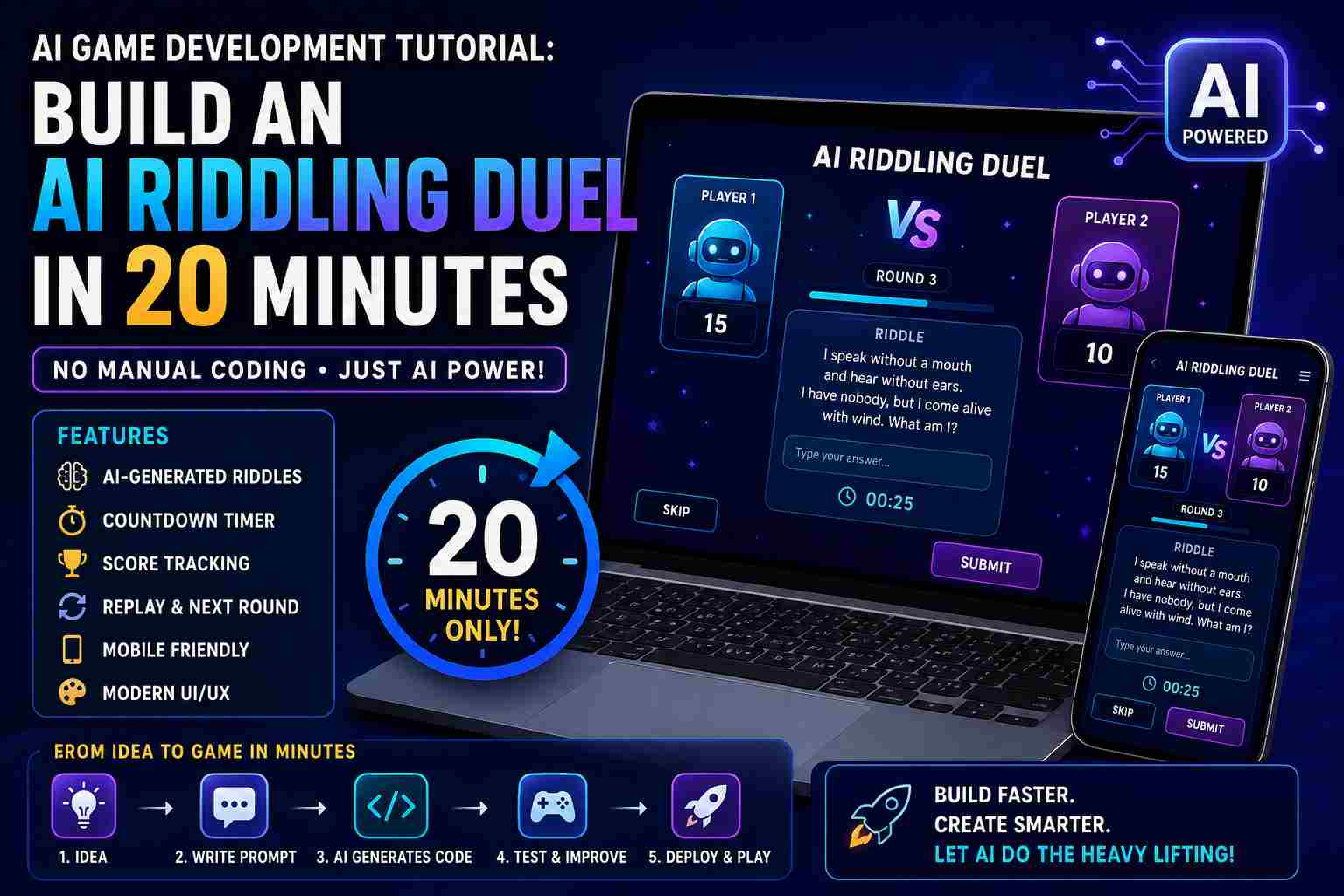
AI Game Development Tutorial: Build an AI Riddling Duel in 20 Minutes
Artificial intelligence is changing the way software is built. Tasks that once took hours of coding can now be completed in minutes with the help of AI development tools. From generating layouts to writing application logic, AI allows developers and beginners to create working projects much faster.
In this tutorial, you’ll learn how I built an AI-powered riddling duel game in just 20 minutes without manually writing every line of code. Instead of focusing on complex programming, the process relied on clear planning, detailed prompts, testing, and small refinements to turn an idea into a working application.
If you’re interested in AI game development, no-code tools, or rapid prototyping, this guide will walk you through each step.
What Is an AI Riddling Duel?
An AI Riddling Duel is an interactive game where players compete to answer AI-generated riddles. Every round presents a new challenge, making the game dynamic and replayable.
Unlike traditional games with a fixed set of questions, AI can generate fresh riddles on demand, helping keep gameplay interesting.
The project includes features such as:
- AI-generated riddles
- Countdown timer
- Score tracking
- Multiple rounds
- Responsive interface
- Replay option
- Mobile-friendly design
These features make the game enjoyable while demonstrating how AI can simplify game development.
Why Build This Project?
The goal wasn’t just to build a game. It was to explore how quickly AI could transform an idea into a working product.
Instead of spending hours setting up a project, writing repetitive code, and debugging the basics, AI handled much of the initial development. This allowed more time to focus on improving the user experience.
Projects like this are perfect for:
- Learning AI-assisted development
- Building a portfolio
- Experimenting with prompt engineering
- Creating a minimum viable product (MVP)
- Understanding modern AI workflows
Project Requirements
Before generating any code, I listed the core requirements.
The game needed to:
- Display one riddle at a time
- Validate answers
- Award points for correct responses
- Show a countdown timer
- Move automatically to the next question
- Display the final score
- Allow users to restart the game
Defining these requirements first made it easier for the AI to generate accurate results.
Step 1: Plan Before You Prompt
One of the biggest mistakes beginners make is asking AI to “build a game” without any details.
A better approach is to define:
- The game objective
- User flow
- Features
- Design preferences
- Platform
- Target audience
The clearer your instructions, the better your results.
Step 2: Write a Detailed Prompt
AI works best when given specific instructions.
Here’s an example:
Build a modern AI-powered riddling duel game with a clean interface, responsive design, score tracking, countdown timer, replay option, and AI-generated riddles. Keep the application lightweight, beginner-friendly, and optimized for desktop and mobile devices.
This single prompt gave the AI enough context to generate a strong starting point.
Step 3: Generate the Project
After submitting the prompt, the AI created the initial version of the application.
It generated:
- Project structure
- Interface
- Buttons
- Game logic
- Timer
- Scoreboard
- Responsive layout
- Styling
Instead of starting with a blank screen, I had a functional project ready for review within minutes.
Step 4: Test Every Feature
Even though AI generated the project, testing remained an important step.
I checked:
- Does the timer count correctly?
- Are scores updated properly?
- Are riddles displayed correctly?
- Can the game restart?
- Does the layout work on mobile?
- Are buttons responsive?
Testing helped identify a few small improvements before considering the project complete.
Step 5: Improve the User Experience
The first version worked, but it could look better.
I refined the interface by improving:
- Button spacing
- Typography
- Colors
- Animations
- Loading speed
- Layout consistency
These small changes made the game feel more polished and enjoyable.
Step 6: Final Review
Before publishing the project, I tested it on different devices and browsers to ensure a consistent experience.
I also reviewed:
- Mobile responsiveness
- Performance
- Accessibility
- Navigation
- Visual consistency
A quick quality check goes a long way toward creating a better product.
What AI Helped Build
AI significantly reduced development time by generating:
- HTML
- CSS
- JavaScript
- Interface components
- Responsive layouts
- Game logic
- Timer functionality
- Score calculation
Instead of replacing creativity, AI handled repetitive tasks and allowed me to focus on refining the experience.
Time Breakdown
Planning: 3 minutes
Prompt writing: 4 minutes
AI generation: 7 minutes
Testing: 4 minutes
Final improvements: 2 minutes
Total development time: Less than 20 minutes.
Lessons Learned
This project reinforced several important ideas.
First, planning matters. A clear project outline leads to better AI-generated results.
Second, prompt quality directly affects the quality of the application.
Third, AI can speed up development, but testing and refinement are still the responsibility of the developer.
Finally, AI is most effective when used as a creative partner rather than a replacement for problem-solving.
How You Can Build Your Own AI Game
If you’d like to create a similar project, follow this process:
- Choose a simple game idea.
- Define the required features.
- Write a detailed prompt.
- Generate the first version using AI.
- Test every feature.
- Improve the design.
- Optimize for mobile.
- Deploy and gather feedback.
Repeating this workflow will help you build projects faster and improve your AI development skills.
Future Improvements
The current version is only the beginning.
Future updates could include:
- Multiplayer mode
- Online leaderboards
- Difficulty levels
- Voice input
- Daily riddle challenges
- User accounts
- Achievement badges
- Sound effects
- AI-generated categories
- Multiplayer matchmaking
Each addition would make the game more engaging while expanding your development experience.
Why I Chose AI Instead of Traditional Coding
When I first thought about building this project, I considered writing everything manually. That would have meant setting up the project structure, designing the interface, creating the game logic, testing every feature, and fixing bugs one by one. Even for a simple game, this process could easily take several hours or even an entire day.
Instead, I decided to use AI as my development partner.
The goal wasn’t to avoid learning programming. It was to eliminate repetitive work and spend more time improving the gameplay and user experience.
Modern AI tools can generate boilerplate code, organize project files, create responsive layouts, and even suggest improvements based on your prompt. This allows developers to focus on solving problems instead of writing repetitive code.
For beginners, AI also lowers the barrier to entry. You don’t need years of programming experience to build your first interactive application. You only need a clear idea and the ability to explain what you want.
The Importance of Writing Good Prompts
One of the biggest lessons from this project was understanding how much prompt quality matters.
AI only knows what you tell it. If your instructions are vague, the results will also be vague.
For example, a prompt like:
“Build me a riddle game.”
doesn’t provide enough detail.
A much better prompt would explain:
What type of game you want
How many players there are
Whether AI should generate riddles
How scoring works
What happens when time runs out
Whether the design should be responsive
Which programming language or framework should be used
Any animations or visual effects you want
The more context you provide, the closer the generated project will match your vision.
Features Included in the Final Project
Although the project was completed in under 20 minutes, it includes several useful features.
AI-Generated Riddles
Instead of storing hundreds of predefined riddles, the game uses AI to create fresh questions. This means players rarely see the same challenge twice.
Live Scoreboard
Each correct answer immediately updates the score, giving players instant feedback.
Countdown Timer
The timer adds excitement and encourages players to think quickly.
Responsive Design
The interface automatically adjusts to desktops, tablets, and smartphones.
Smooth Animations
Simple animations make the game feel more interactive without affecting performance.
Replay Button
Players can instantly start another match without refreshing the page.
Challenges I Faced During Development
Although AI made development much faster, there were still a few challenges.
Sometimes the generated layout wasn’t perfectly aligned.
In one version, the timer overlapped other elements on smaller screens.
Another issue involved score updates after restarting the game.
Fortunately, these problems were relatively small and easy to fix with a few additional prompts and minor adjustments.
This highlights an important point: AI accelerates development, but developers still need to review and test the final product carefully.
How AI Reduced Development Time
To better understand the impact of AI, let’s compare the traditional approach with the AI-assisted workflow.
| Task | Traditional Development | AI-Assisted Development |
|---|---|---|
| Project setup | 20–30 minutes | 2 minutes |
| UI design | 2–3 hours | 5 minutes |
| Game logic | 2 hours | 6 minutes |
| Responsive styling | 1–2 hours | 4 minutes |
| Testing | 30 minutes | 20 minutes |
| Total | 6–8 hours | Less than 20 minutes |
This doesn’t mean AI replaces developers. Instead, it dramatically speeds up repetitive tasks and provides a strong starting point.
Best Practices for AI Game Development
If you’re planning to build your own AI-powered applications, here are some practical tips:
Always begin with a clear project plan.
Break large projects into smaller tasks.
Test every generated feature.
Ask AI to explain unfamiliar code.
Improve the design after the first version is generated.
Keep prompts detailed and specific.
Save different versions of your project.
Optimize for mobile devices before publishing.
Focus on the user experience, not just functionality.
Continue learning programming concepts while using AI tools.
Following these practices will help you build better applications and become a more confident developer.
Common Mistakes Beginners Make
Many people expect AI to generate a perfect application on the first attempt.
In reality, AI development is an iterative process.
Some common mistakes include:
Using very short prompts
Skipping testing
Ignoring responsive design
Forgetting accessibility
Not organizing project files
Publishing without optimization
Expecting AI to understand unclear instructions
Avoiding these mistakes will save time and produce better results.
SEO Tips for Publishing AI Project Blogs
If you plan to write about your AI projects, optimizing your content for search engines can help more readers discover your work.
Some useful SEO practices include:
Use your primary keyword naturally in the title, introduction, headings, and conclusion.
Write a clear meta title and meta description.
Add descriptive image alt text.
Use short paragraphs for better readability.
Include internal links to related tutorials.
Add external links to official documentation when relevant.
Compress images to improve page speed.
Ensure the page works well on mobile devices.
Update the article as your project evolves.
Google rewards content that demonstrates genuine experience and provides practical value to readers.
What’s Next?
Building this AI Riddling Duel was only the first step.
Future versions could introduce:
Online multiplayer support
AI-generated voice narration
Daily tournaments
User profiles
Global leaderboards
Custom game themes
Team battles
AI-powered hints
Multiple game modes
Achievement rewards
These enhancements would make the project more engaging while providing additional opportunities to learn modern AI development techniques.
Final Takeaway
Completing this project in less than 20 minutes showed me that AI isn’t just a tool for generating code. It’s a powerful assistant that can speed up development, simplify repetitive tasks, and help transform ideas into working applications much faster than traditional workflows.
The most important factor wasn’t the AI itself. It was the quality of the planning, the clarity of the prompts, and the time spent refining the final result.
If you’re interested in AI game development, don’t wait for the perfect idea. Start with a simple project, experiment with different prompts, and improve your work one step at a time. Every project you build will strengthen your skills and help you understand how to make the most of AI-assisted development.