Free Picture Stencil Maker Online
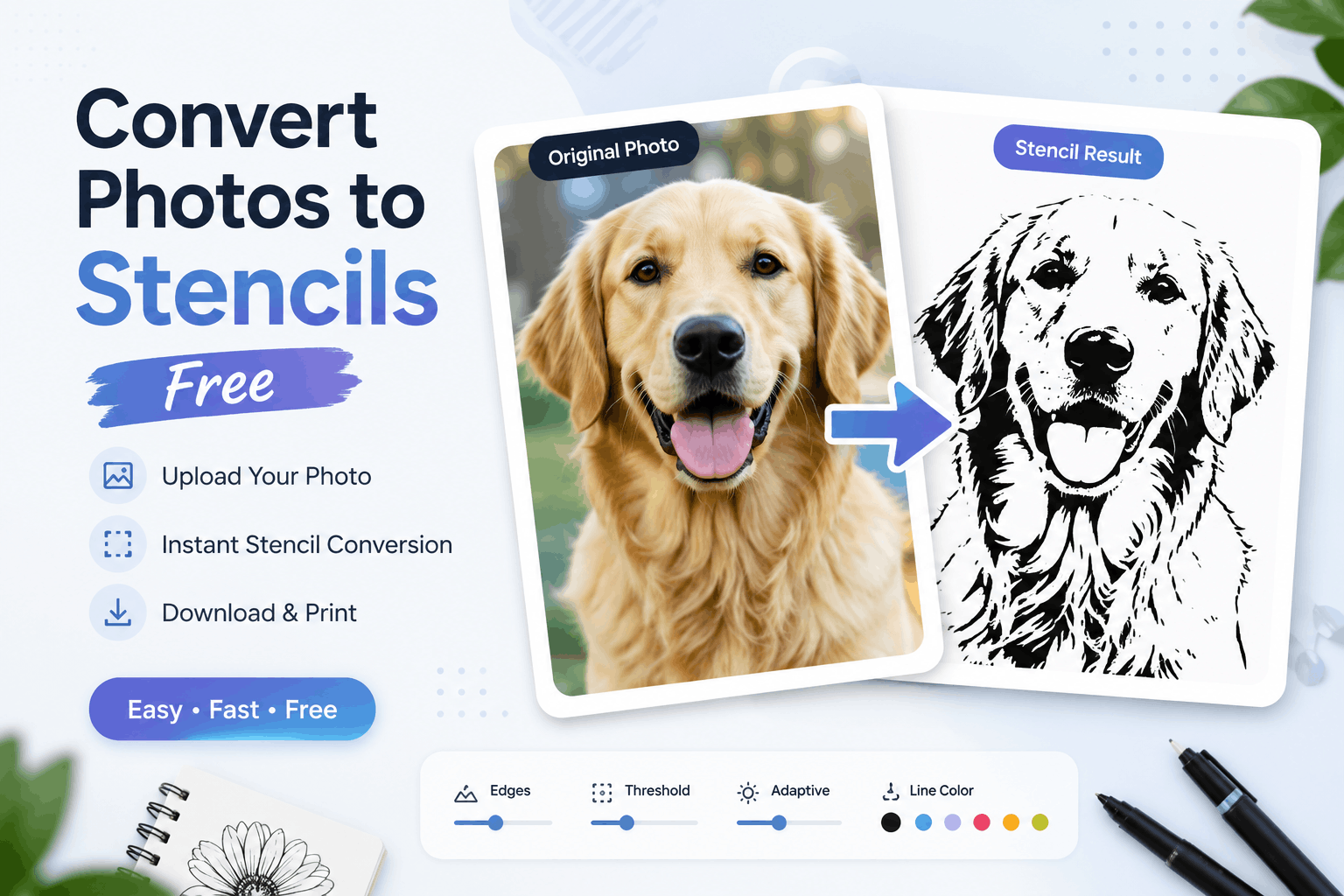
Creating custom stencils has never been easier. Whether you’re an artist, crafter, teacher, designer, or DIY enthusiast, our Free Picture Stencil Maker Online helps you transform any image into a clean, printable stencil in just a few clicks. There’s no need to install complicated software or learn advanced editing techniques. Simply upload your image, adjust the stencil settings, preview the results, and download your finished design instantly.
Our online stencil maker is designed to be fast, user-friendly, and accessible on any device. Whether you’re working on a creative art project, a wood-burning pattern, a tattoo outline, or a painting template, this free tool makes the process simple and efficient.
What Is a Picture Stencil Maker?
A picture stencil maker is an online tool that converts photographs or digital images into simplified black-and-white outlines. Instead of preserving every color and detail, the tool highlights the most important edges and shapes, creating a clean stencil that is easy to print, trace, paint, or cut.
Stencils are commonly used in arts and crafts, sign making, spray painting, woodworking, laser engraving, classroom activities, and many other creative projects. By removing unnecessary details and emphasizing the main outlines, the stencil becomes easier to work with while maintaining the original design.
How Does the Free Picture Stencil Maker Work?
Using the tool is simple and takes only a few minutes.
Step 1: Upload Your Image
Select an image from your device. The tool supports popular image formats such as JPG, PNG, WEBP, and SVG.
Step 2: Generate the Stencil
Once uploaded, the tool automatically analyzes your image and detects the main edges and outlines. Within seconds, it converts your photo into a clean stencil preview.
Step 3: Customize the Output
Adjust the available settings to improve the stencil quality. You can modify edge detection, threshold levels, line thickness, adaptive mode, and line color to achieve the desired look.
Step 4: Download or Print
After you’re satisfied with the result, download the stencil to your device or print it directly for your project.
Key Features of Our Online Picture Stencil Maker
Completely Free to Use
Our stencil maker is available at no cost. There are no subscriptions, hidden fees, or software licenses required.
No Installation Required
Everything works directly in your web browser. There’s no need to download or install additional programs.
Fast Image Processing
The tool generates stencil previews almost instantly, allowing you to edit and download your design within seconds.
Adjustable Edge Detection
Control how much detail appears in your stencil by adjusting the edge detection settings. This helps create either detailed outlines or cleaner, simpler designs.
Threshold Control
The threshold slider allows you to increase or decrease image contrast. A lower threshold preserves more details, while a higher threshold produces bold, simplified stencil lines.
Adaptive Processing
Adaptive mode automatically improves edge detection by adjusting to different lighting and contrast levels in your image, resulting in smoother and more accurate outlines.
Custom Line Color
Instead of limiting yourself to black outlines, you can choose a different line color to match your project or printing needs.
Instant Preview
See the original image and the generated stencil side by side. This makes it easy to compare changes before downloading.
Print Ready
The finished stencil is optimized for printing and can be used immediately for creative projects.
Privacy Focused
Image processing is performed locally in your browser whenever possible, helping keep your uploaded photos private.
Benefits of Using an Online Stencil Maker
Choosing an online stencil maker offers several advantages over traditional editing software.
- No technical experience required
- Works on Windows, Mac, Linux, Android, and iPhone
- Saves time with automatic processing
- Produces clean and professional-looking outlines
- Accessible from anywhere with an internet connection
- Suitable for beginners and professionals alike
- No expensive software purchases
Whether you’re creating one stencil or hundreds, the online tool provides a quick and reliable solution.
Common Uses for Picture Stencils
Picture stencils are useful in a wide variety of creative and professional applications.
DIY Crafts
Create personalized decorations for home projects, greeting cards, gift boxes, and handmade crafts.
Painting Projects
Transfer artwork onto walls, canvas, furniture, or fabric using reusable stencil templates.
Tattoo Design
Convert photographs into simple outline references for tattoo planning and artistic inspiration.
Wood Burning
Generate clear patterns that can be traced onto wood before engraving or pyrography.
Spray Painting
Design reusable stencils for street art, murals, and decorative wall painting.
Laser Engraving
Prepare images for laser cutting or engraving by creating clean line art with minimal noise.
Vinyl Cutting
Create simplified designs compatible with vinyl cutting machines for signs, decals, and stickers.
Educational Activities
Teachers can generate tracing worksheets, coloring pages, and learning materials from photos and illustrations.
Tips for Getting Better Stencil Results
To create high-quality stencils, follow these simple recommendations.
Use High-Resolution Images
Clear images produce sharper outlines and better edge detection.
Choose High-Contrast Photos
Images with distinct differences between the subject and background create cleaner stencil results.
Remove Busy Backgrounds
Simple backgrounds help the software focus on the main subject.
Adjust the Threshold
Experiment with threshold settings until you achieve the right balance between detail and simplicity.
Preview Before Downloading
Always review the generated stencil before saving to ensure it matches your expectations.
Why Choose Our Free Picture Stencil Maker?
Many image editing applications require expensive subscriptions and advanced editing knowledge. Our online tool removes those barriers by offering a simple interface that anyone can use.
Unlike traditional software, our Picture Stencil Maker provides:
- Fast online processing
- Beginner-friendly interface
- Multiple adjustment options
- No installation required
- Instant downloads
- Mobile compatibility
- Secure browser-based processing
Whether you’re creating a stencil for art, education, or professional work, our tool delivers reliable results without unnecessary complexity.
Conclusion
Our Free Picture Stencil Maker Online is the perfect solution for anyone who wants to convert photos into clean, printable stencils quickly and easily. With support for multiple image formats, customizable edge detection, threshold adjustments, adaptive processing, and instant downloads, you can create professional-looking stencil designs without installing software or paying for expensive editing tools.
Whether you’re an artist, student, teacher, designer, or DIY enthusiast, this tool simplifies the stencil creation process while delivering high-quality results. Upload your image today, customize your stencil, and download a printable design that’s ready for your next creative project.
Frequently Asked Questions
Find answers to common questions about our free Picture Stencil Maker online.